Category: Ethernet Cables

This category pertains to content related to ethernet cables

  • Do Different Ethernet Cables Have Different Transfer Speeds?

    Do Different Ethernet Cables Have Different Transfer Speeds?

    Different Ethernet Cables Different Transfer Speeds title page

    It’s a fair question to ask if all ethernet cables are the same.

    After all, they all look and function the same way.

    Even if your ethernet cables are different colors, they’ll do the same thing: transfer data from one device to another.

    I wish I could say it was that easy.

    Even though they all look similar, ethernet cables can actually be quite different from each other. In hearing this, it’s natural to wonder if the speeds that ethernet cables support are different from cable to cable.

    So do all ethernet cables support the same data transfer speed, or do different ethernet cables support different speeds?

    The answer here is no.

    Not all ethernet cables support the same data transfer speeds. Ethernet cables will support different maximum data transfer speeds depending upon the category of cable they are.

    With that said, all ethernet cables of the same category will support the same data transfer speed.

    It’s important to understand the maximum data transfer speed of each category of cable. On top of that, you should also know how to identify the cables that you have in your home network. That way, you can determine if you’re using the right cables in your network.

    In this article, I’ll detail everything you need to know about ethernet cables and the data transfer speeds they support. I’ll also talk about the cables you should be using in your network.

    Why Do Different Categories of Ethernet Cables Support Different Speeds?

    As you may have guessed, the category (or cat) of an ethernet cable is used to provide an easy way to identify them. The category classification is useful because it’s the single most important factor in determining how it’ll perform.

    Why is this?

    That’s because the category of your cable identifies the performance standards it has been manufactured to.

    This all has to do with the standards established by the Telecommunications Industry Association (TIA).

    In order for an ethernet cable to be recognized as a member of a certain category, it has specific requirements it must meet. The TIA is the organization that’s responsible for setting and publishing these requirements.

    As a result of these standards, you can expect every ethernet cable in the same category to perform the same way. It doesn’t matter who the manufacturer is or how long the cable is. As long as it’s made to the specifications required of that category, it’ll perform the same as the other cables in that category.

    This is the same reason why different categories of cables support different transfer speeds.

    The TIA has established a different maximum speed requirement for each category of cable. So if you have two cables that are in different categories, they’ll support different speeds.

    This essentially boils down to the frequency that each category of cable supports.

    That discussion can get a little technical, so we’ll keep it at a high level here.

    All you have to know is that different categories of cables will support different maximum data transfer speeds because of the requirements established by the TIA.

    This is how you know the transfer speed supported by a cable once you know what category it’s in.

    Speaking of which…

    What Speed Does Each Ethernet Cable Category Support?

    It’s very important to understand the data transfer speeds supported by the different categories of cables. Without this information, you won’t know what category of cable to get for your network.

    If you buy the wrong type of ethernet cable, it can be costly for your network. In fact, the wrong cable can limit the speed of your internet connection if you’re not careful.

    We’ll discuss how to select the proper category of cable later on.

    Ok, so what transfer speeds are supported by the different categories of cables?

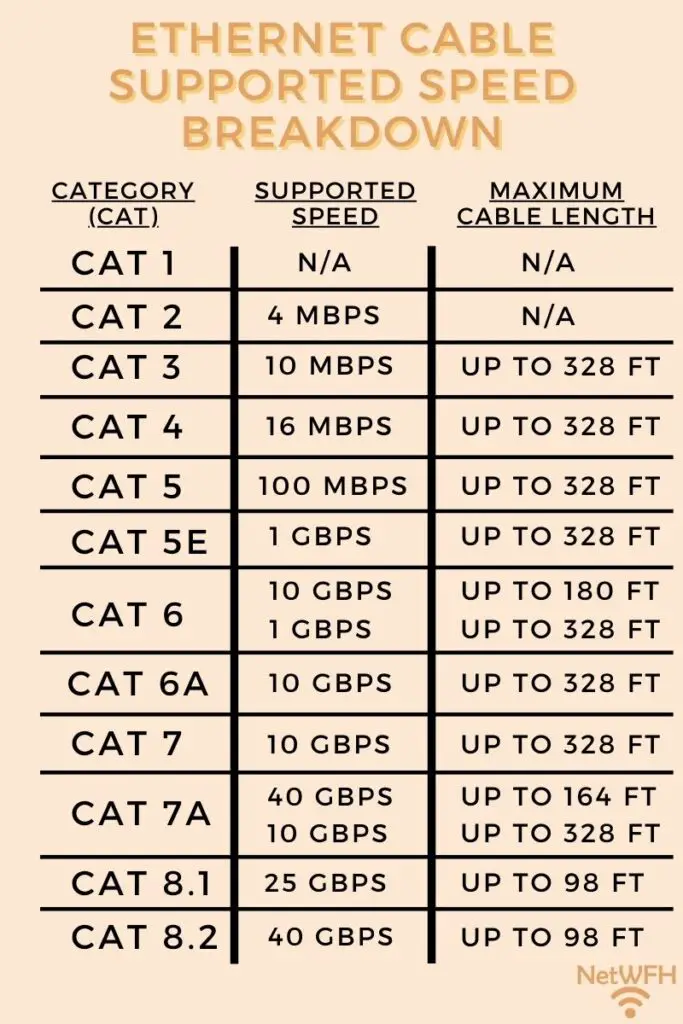
    There are 8 different categories of ethernet cables. The maximum speeds supported by these cables range anywhere from 4 megabits per second (Mbps) to 40 gigabits per second (Gbps).
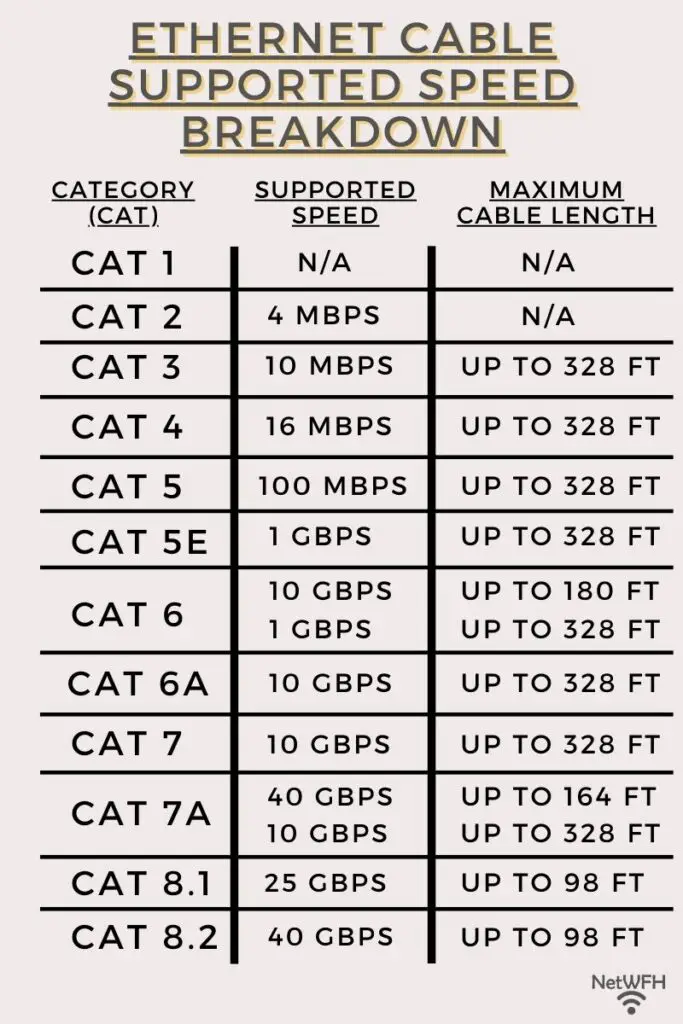
    Ethernet cable category speed comparison

    As you can see, the higher the category of cable, the faster the maximum data transfer speed it can support.

    When looking at this information, it’s important to note that the higher categories have been developed more recently than the earlier versions. It can be expected that the newer categories support faster speeds than those that were previously developed.

    Ethernet cables have to support faster speeds now than they used to due to advancements in information technology. Computers and internet devices are only getting faster as newer technologies are invented.

    What Ethernet Cable Categories Are Used Today?

    Understanding the speeds supported by these 8 categories might seem like a lot, but fear not.

    It’s actually much easier than it seems.

    Due to advancements in technology since the first category of ethernet cables was established, most of the categories listed above can’t support current network speed requirements.

    As a result, they aren’t used in modern networks.

    In fact, you probably won’t see anything older than category 5e cables in modern networks. That’s because most networks and internet plans require speeds faster than 100 Mbps.

    So you only really need an understanding of the speeds supported by cat 5e cables and above.

    What Is the Fastest Category of Ethernet Cable?

    When it comes to ethernet cables, a common question that comes up is about which ethernet cable is the fastest.

    Although it’s easy to point to the diagram above and say that cat 8 cables are the fastest, that’s not the right question to ask.

    What you should really be asking is what ethernet cable category supports the speed of your network. That’s because ethernet cables don’t make your network faster. They simply support the speeds required by your internet plan and devices.

    Hear me out here.

    Basically what I mean to say is that your ethernet cables are simply infrastructure for the data moving throughout your network.

    Ethernet Cable Speed Example

    Think about the maximum speed supported by your ethernet cables like the speed limit on a road.

    The speed limit is the fastest possible speed you can be driving on the road. In this example, let’s say the speed limit is 100 MPH.

    If you vehicle has a top speed of 120 MPH, it can only drive 100 MPH on this road. In essence, the speed limit is limiting the speed of your car to 100 MPH.
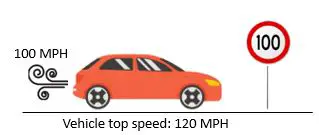
    120 MPH vehicle on 100 MPH speed limit road

    However, if your vehicle has a top speed of 40 MPH, it’ll drive 40 MPH on the road with a speed limit of 100 MPH. Whether the speed limit is 100 MPH or 60 MPH, the top speed of your car will be 40 MPH on the road.
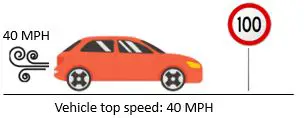
    40 MPH vehicle on 100 MPH speed limit road

    In other words, your vehicle will be able to travel at its top speed (40 MPH) as long as the speed limit is above your vehicle’s max speed.

    This principle is the same with your ethernet cables.

    Your ethernet cables only need to be able to support the speed of your devices and internet connection. The only thing that matters is that the maximum supported speed of your ethernet cables is more than the required speed of your network.

    If your internet plan is for a maximum speed of 200 Mbps, it doesn’t matter if your ethernet cables can support a maximum speed of 1 Gbps or 10 Gbps. In both cases, your internet plan will be able to operate at 200 Mbps without limitation.
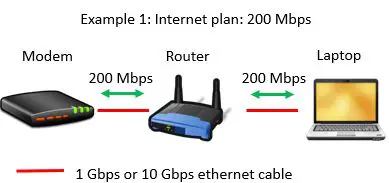
    200 Mbps internet plan with 1 Gbps or 10 Gbps ethernet cables example

    However, if your internet plan supports a maximum speed of 200 Mbps but you ethernet cables only support 100 Mbps, you have a problem. Your ethernet cables will limit your internet speed to 100 Mbps. That’s the maximum speed your cables will support.
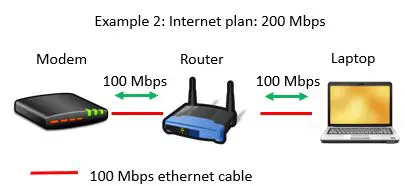
    200 Mbps internet plan with 100 Mbps ethernet cables example

    In this case, you would need to have ethernet cables that support speeds of at least 200 Mbps in order for your network to operate without restriction.

    Hopefully this example helps you understand the relationship between the supported speed of your ethernet cables and the speed of your network.

    What Category of Ethernet Cable Do I Need?

    When it comes to determining what category of ethernet cable you need, there’s other information you need in order to make your decision.

    The most important information you need is the maximum speed of your current internet plan.

    If you’re not sure where to find this, it should be listed on your most recent internet bill. If you’re still not sure, you can call your internet service provider (ISP) and they can look it up for you.

    It should be pretty straightforward once you have your internet plan. As I mentioned, you just need to make sure your ethernet cables support speeds faster than your current internet plan.

    For example, if your internet plan provides speeds of up to 500 Mbps, you need to make sure your ethernet cables support a maximum speed of at least 500 Mbps.

    Another thing to keep in mind is if you plan on upgrading your internet plan in the near future. If so, you want to take that into account when buying your ethernet cables.

    You’ll want to make sure your ethernet cables will be able to support any upgrades to your plan. You won’t want to replace your cables if you upgrade your plan in the near future.

    For your reference, most networks today use cat 5e and cat 6 cables. These cables support maximum speeds of 1 Gbps and 10 Gbps, respectively.

    With the internet plans that are currently available, you won’t need ethernet cables that support speeds faster than that. As long as you buy cat 5e or cat 6 cables for your network, it should be able to operate at top speed.

    As we previously discussed, although cat 8 cables can support the fastest maximum speeds, they’ll be overkill for any of your network needs in the foreseeable future.

    Wrap Up

    Ok, now you have all the basics about ethernet cables and their transfer speeds.

    If you have any questions about this information, please feel free to leave a comment below. If you’d like to learn more about ethernet cables and how they function in your home network, check out some of these other articles I’ve written:

    Does Ethernet Cable Frequency Matter?

    How to Tell What Type of Ethernet Cable You Have

    Does Ethernet Cable Length Affect Network Speed?

    Does Using an Ethernet Cable Matter for Gaming?

    Can an Ethernet Cable Slow Your Internet Speed?

  • What Is RJ45 Used For? An Analysis

    What Is RJ45 Used For? An Analysis

    RJ45 used for title page

    For anyone that has set up a home network, you’ve probably heard of the term “RJ45”.

    This is a word that frequently gets thrown around in the context of ethernet cables. Despite how often it’s used, RJ45 is a term that many people don’t really understand.

    As a result, it’s often used incorrectly. This only creates more confusion.

    So what exactly is RJ45, and what’s it used for in your home network?

    RJ45 stands for “registered jack 45”, and it refers to the connectors at the ends of your ethernet cables. RJ45 is a standard that ensures all ethernet cable connectors are made the same way. As a result, RJ45 connectors are used to connect all your ethernet cables to your home network devices.

    In this post, I’ll detail the uses of RJ45, as well as what this standard entails.

    What Is an RJ45 Connector?

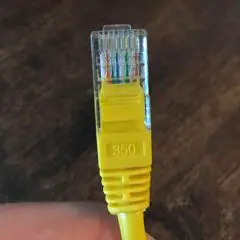
    I’m sure you’ve seen hundreds of these before, even if you didn’t know what they were called at the time. This is an RJ45 connector:

    RJ45 Connector

    In the picture above, the RJ45 connector is attached to an ethernet cable.

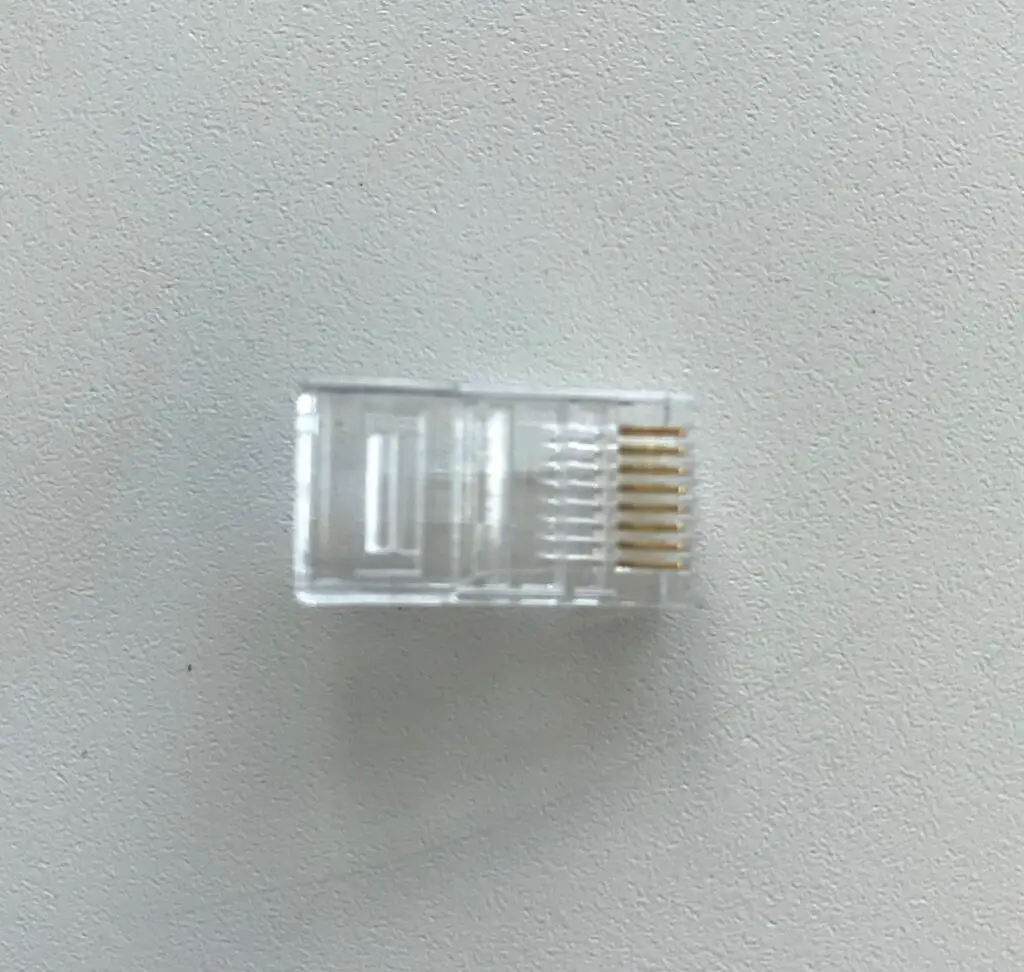
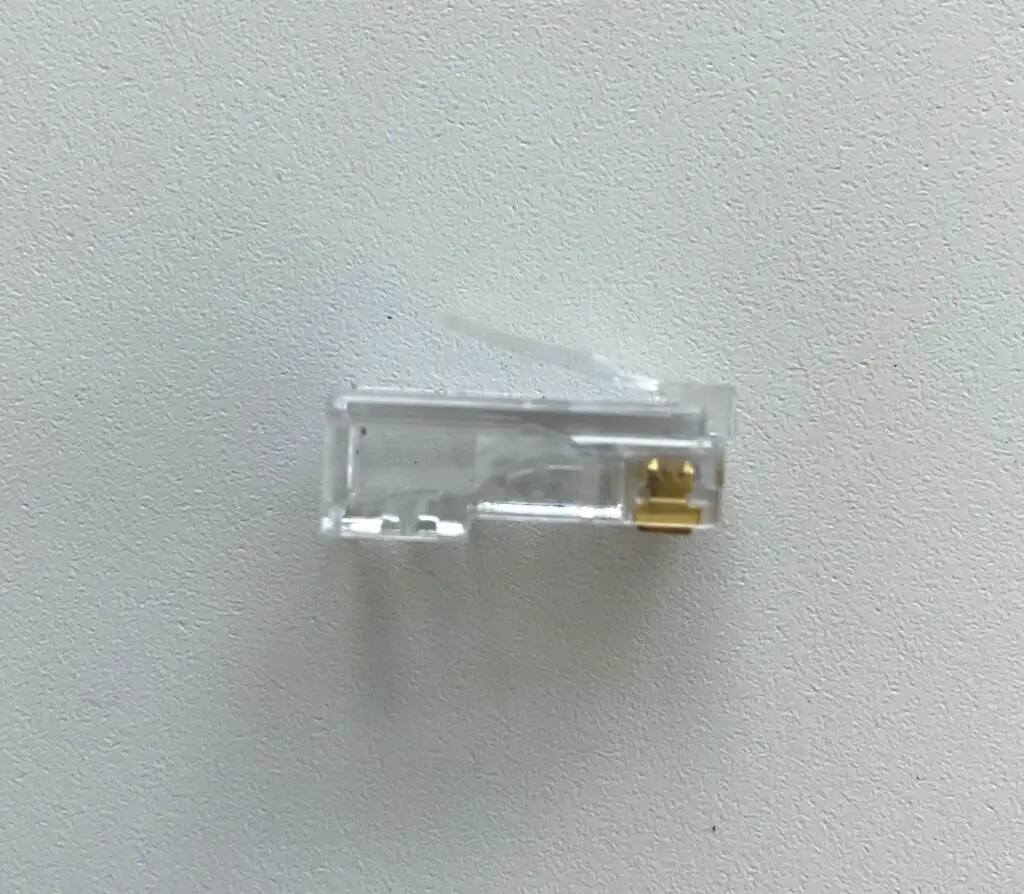
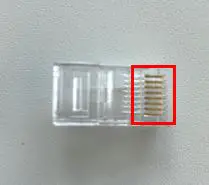
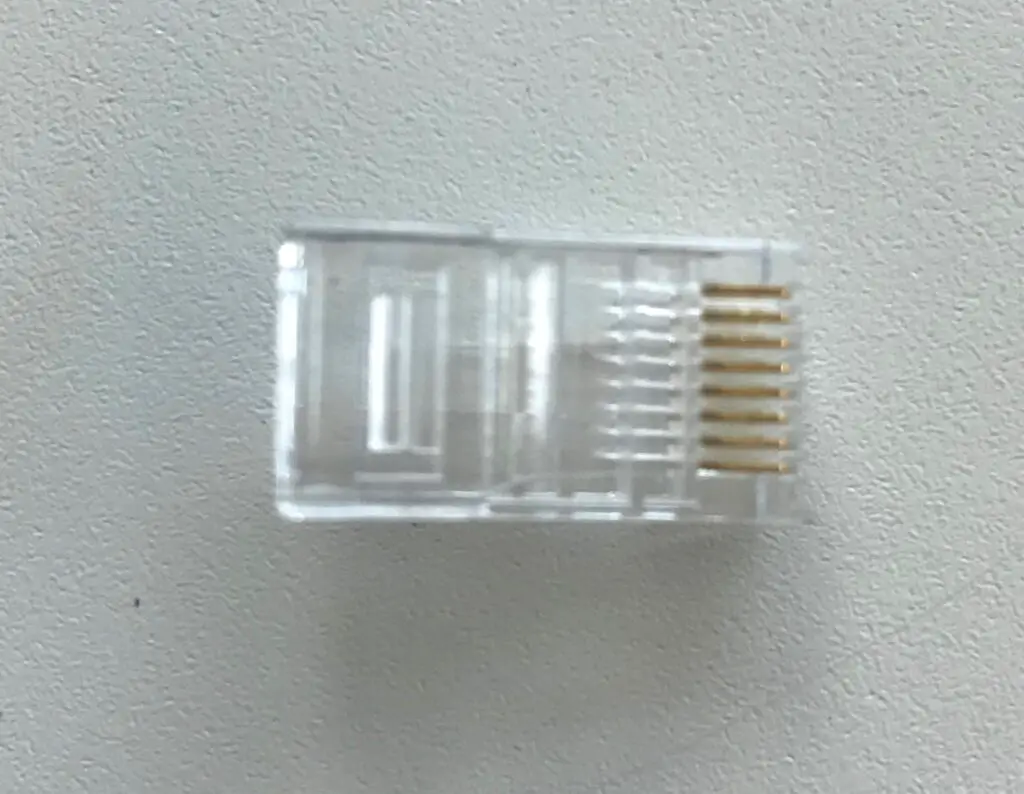
    For reference, here’s what an RJ45 connector looks like before it’s attached to an ethernet cable:

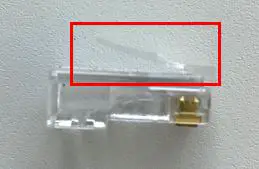
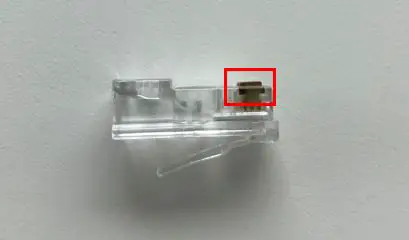
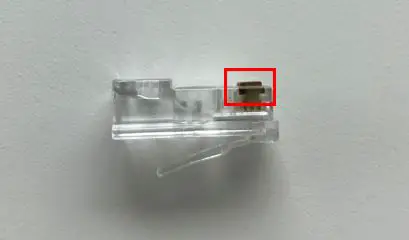
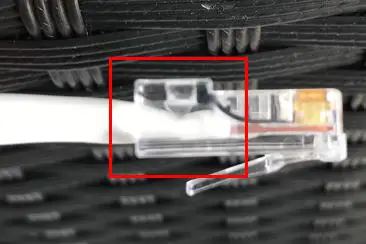
    To put it simply, RJ45 connectors allow you to plug your ethernet cables into your devices. Once connected to a device, the tab on top of the connector keeps it from falling out of the device.

    RJ45 connector tab

    It’s safe to say RJ45 connectors keep good tabs on your ethernet connections.

    Ok, enough of the jokes.

    If we take a closer look at these connectors, you’ll see that there’s more to them than you might think.

    How Does an RJ45 Connector Work?

    In order to understand how an RJ45 connector works, we need to understand each of their components.

    Let’s take a look at the major aspects of these connectors.

    RJ45 Connector Pins

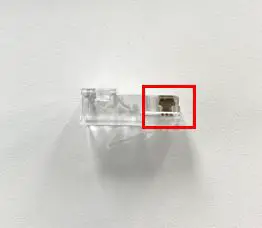
    Each connector has 8 metallic pins on it.

    Pins on RJ45 connector

    Why’s that exactly?

    That’s because inside your ethernet cable, there are 8 copper wires. These copper wires are used to transfer data from one end of the cable to the other. Data is sent through the copper wires in the form of electric signals.

    The metallic pins on the RJ45 connector allow the electric signals to transfer from your ethernet cable to the device they’re connected to. There’s one metallic pin for each wire inside the ethernet cable.

    RJ45 Connector Channels

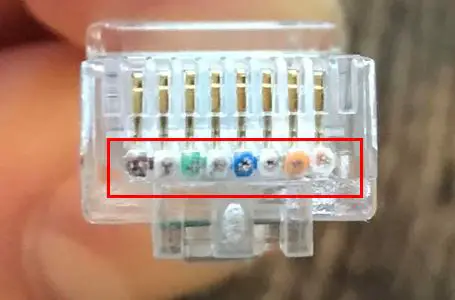
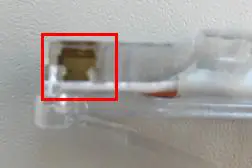
    To make it easy for the wires in the cable to match up with the pins on the RJ45 connector, there are 8 channels inside the RJ45 connector. Each wire in the cable fits into a designated channel, and each channel aligns with a designated pin.

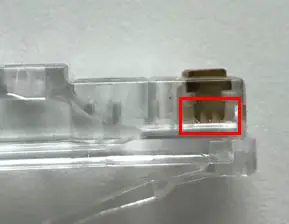
    If you look closely at the end of an RJ45 connector, you can see the 8 channels that the copper wires fit in.

    RJ45 connector channels
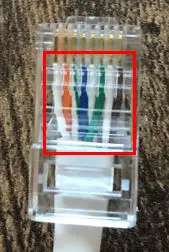
    Ethernet cable copper wires inside their designated channels before an RJ45 connector is crimped

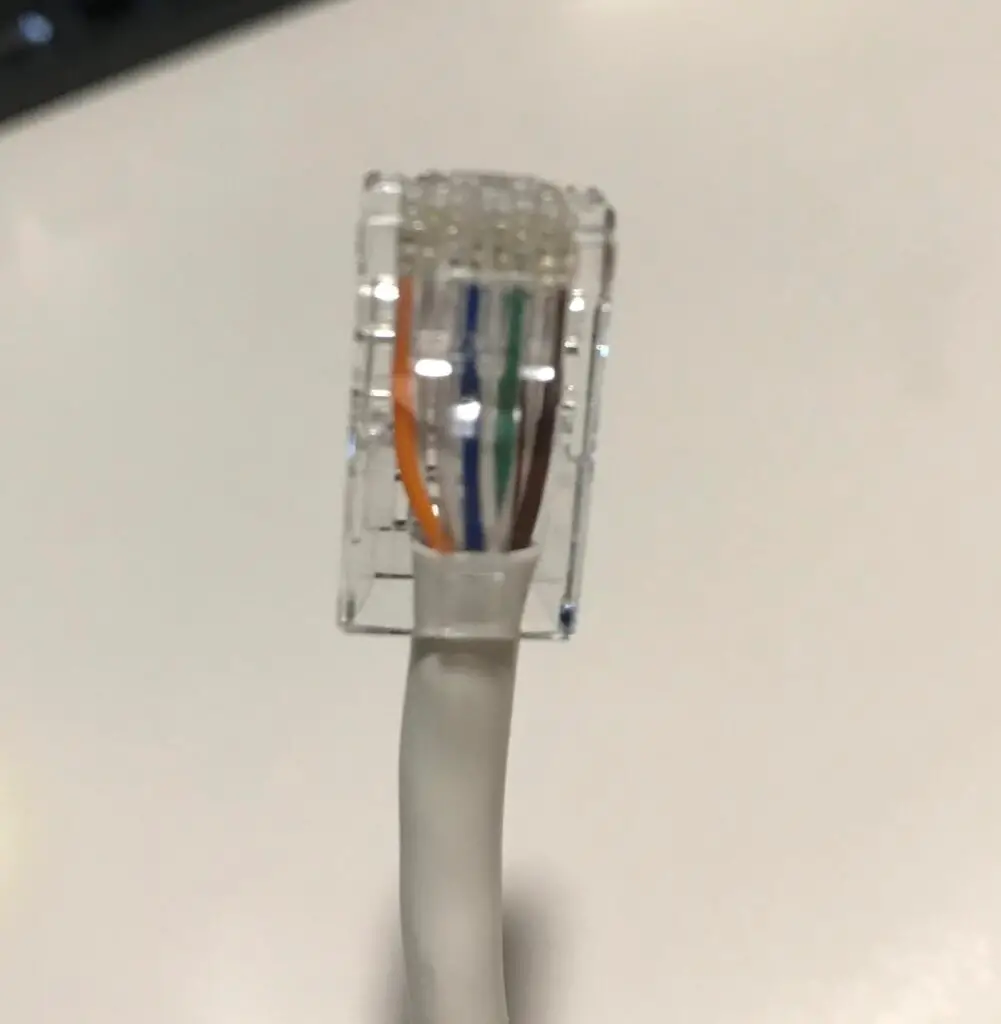
    As you can see, these 8 channels are side by side. This aligns the 8 copper wires next to each other in the RJ45 connector. When the connector is attached to an ethernet cable, you can see the 8 copper wires from the cable are aligned next to each other.

    Copper wires inside RJ45 connector

    As a result of their configuration, you’ll see RJ45 connectors described as being 8-pin/8-position connectors. There are 8 pins on the RJ45 connector, and there are 8 positions (i.e. channels) that the copper wires can fit in. The correct order of the wires inside the RJ45 connector is defined by established RJ45 pinout standards.

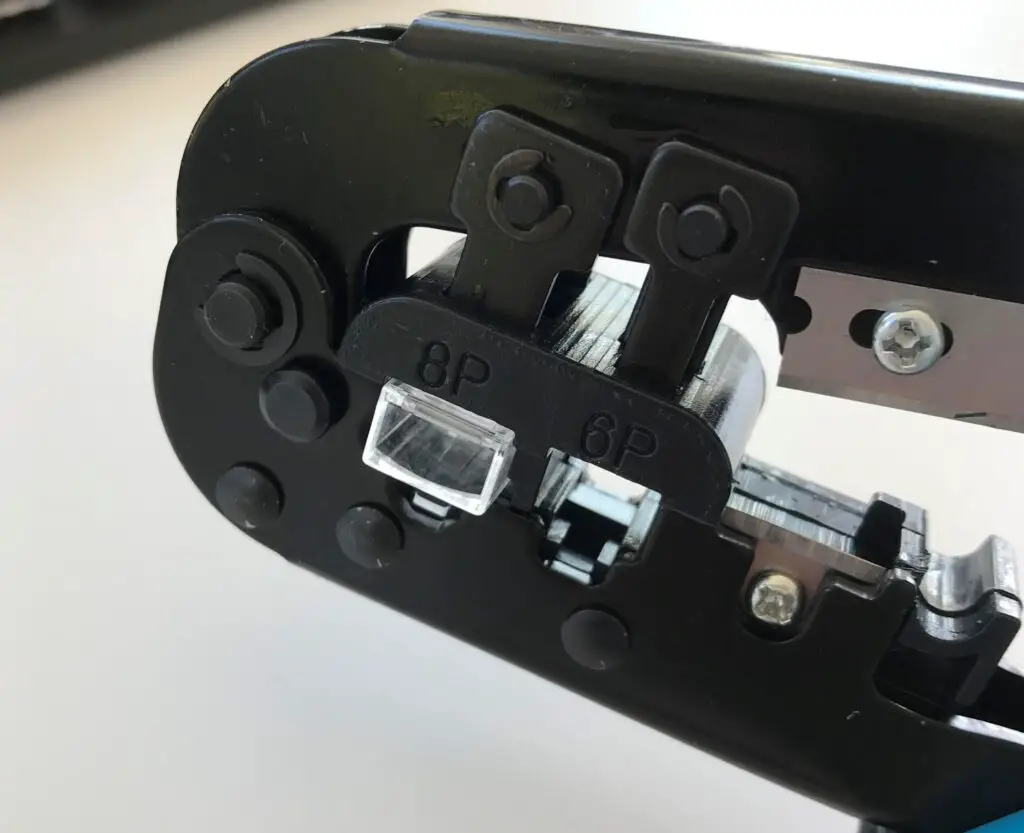
    To attach a connector to the end of a cable, a process called crimping is used. In this process, each pin on the connector is stamped onto the copper wire in its channel. Crimping the RJ45 connector onto the ethernet cable ensures a good connection between the connector’s pins and the cable’s wires.

    This would be a lot harder to do if it weren’t for the channels in the connector.

    RJ45 Standard

    The pins and channels on RJ45 connectors ensure that data is able to reliably travel between the two devices that’re connected with an ethernet cable.

    In addition to their functional benefits, RJ45 connectors also provide standardization to home networking. This is the most important aspect about them.

    RJ45 is a standard that was established by the Federal Communications Commission (FCC) in 1987. The “RJ” stands for “registered jack”, and the “45” is a way to identify that these jacks are meant for use with ethernet cables.

    This standard provided specifications for these connectors, including how they should be made, the proper way to wire them, and how they should handle electronic signals.

    This is why all ethernet cable connectors look and function the same way.

    Having a standard set of specifications for RJ45 connectors makes things much easier for both the customer and the manufacturers of networking devices.

    Manufacturers of network devices know the specifications that ethernet cable connectors are made to. This makes it easier for them to add ethernet ports to the devices they manufacture.

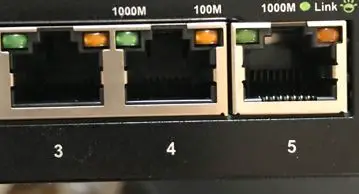
    Ethernet ports
    Thanks to the RJ45 standard, all ethernet ports on your devices will look like these

    That’s because they know that all connectors being plugged into them will be the same.

    From the perspective of the customer, it makes this much easier for us as well.

    We know that our ethernet cables will plug into any network device in our home without any issues. We don’t need to worry about having different ethernet cables with different connectors on the ends of them.

    Do All Ethernet Cables Use RJ45?

    In hearing about the RJ45 connector standard for ethernet cables, I imagine you may have some questions.

    One important question to answer is if there are any ethernet cables that are exceptions to the standard. Do exceptions exist, or will all ethernet cables have RJ45 connectors on them?

    You can rest assured. Any ethernet cable you’ll come across will have RJ45 connectors.

    With that said, it’s important to note that not every ethernet cable was originally designed this way.

    Interestingly enough, category 7 cables were designed to use different connectors. The problem with this was that every other category of cable was using RJ45 connectors.

    As a result, these connectors weren’t widely adopted by manufacturers.

    In coming to this realization, manufacturers of category 7 cables started outfitting them with RJ45 connectors. So if you see any category 7 cables today, they’ll probably have RJ45 connectors on them as well.

    Talk about fitting in with the crowd.

    If you’re interested, you can check out the connectors that category 7 cables were originally designed to have. There were actually several different options that were possible. They were called GG45, which stands for “GigaGate 45” or ARJ45, which stands for “Augmented RJ45”. Another possible option was TERA connectors.

    When it comes to connectors on ethernet cables, you don’t have to worry about anything other than RJ45. Although it’s possible you may come across the different category 7 connectors, they’re rarely used today.

    What Devices Connect to RJ45?

    Ok, so RJ45 connectors will be on all of your ethernet cables.

    But what about the devices the cables connect to? Will all devices be compatible with an RJ45 connector?

    In talking about the devices that an RJ45 connector can connect to, the list is exhaustive.

    It’ll be hard to list every type of device that an ethernet cable can fit in. Just know that almost every internet-connected device in your home or office will have an ethernet port for an RJ45 connector.

    Some common devices with RJ45 ethernet ports are as follows:

    • Laptops
    • Desktops
    • Ethernet switches
    • Printers
    • Apple TVs
    • Modems
    • Routers
    • Home security cameras
    • Home sound systems and speakers
    • Smart TVs
    • Office phones
    • Wireless access points

    This list is just scratching the surface. There are a number of other devices that’re also compatible with RJ45 connectors. A good way to think about this is: if the device connects to the internet and has an ethernet port, it’ll be compatible with RJ45 connectors.

    Is RJ45 Fiber or Copper?

    A common question surrounding RJ45 connectors is what types of cables they’re for.

    Referring back to the RJ45 standard, they’re designed for ethernet cables with copper wires. In other words, an RJ45 connector won’t fit onto a fiber cable.

    With that said, there’s an easy solution if you need a connector for a fiber cable. You can buy a media converter that serves as an adapter between a fiber connector and RJ45 connector. A media converter will allow you to connect a fiber optic cable to an ethernet cable, which you can then plug into your network devices.

    Wrap Up

    You should now have enough knowledge about RJ45 connectors to impress your friends with. If you have questions about any of the above information, or you have follow up questions, please drop a comment below.

    If you’d like to continue your learning about other similar topics, these other posts I’ve written may interest you:

    What Are Ethernet Cable Pinout Standards?

    Does Using an Ethernet Cable Matter for Gaming?

    How to Tell What Type of Ethernet Cable You Have

    Are Ethernet and Phone Cables the Same?

    What Do Ethernet Link Lights Mean?

  • What Do Ethernet Link Lights Mean?

    What Do Ethernet Link Lights Mean?

    Ethernet Link Lights Mean title page

    Have you ever noticed lights on an ethernet port and wondered what they mean?

    You know, the ones that light up when you plug an ethernet cable into them?

    If you’re not sure if you’ve seen any before, check out the ethernet ports on your laptop or ethernet switch (if you have one in your network). You might have some lights on these ports depending upon the types of devices you own.

    If you don’t, fear not. There’ll be plenty of visual examples in this post.

    Now that you have an idea of what I’m referring to, let’s get back to the question at hand.

    What is the purpose of these lights on your ethernet ports? Also, what do these lights tell you?

    The lights on ethernet ports are called link lights. Ethernet port link lights will identify the status of the connection between the ethernet port and the device connected to it. They will also identify if data is currently being transmitted over the ethernet cable connected to the ethernet port.

    In this post, I’ll tell you all you’d ever want to know about ethernet port link lights. I’ll break down what you should expect from the link lights on your ethernet ports, and how you can use them to get useful information about your network.

    What Do Ethernet Port Link Lights Look Like?

    Before we get into the details of what ethernet port link lights mean, let’s make sure we know how to identify them first.

    As I mentioned in the section above, you’ll commonly find ethernet port link lights on your laptop or household ethernet switch. In larger scale office settings, you can find link lights on devices like servers and commercial routers.

    Let’s take a look at a few examples.

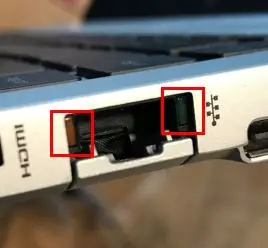
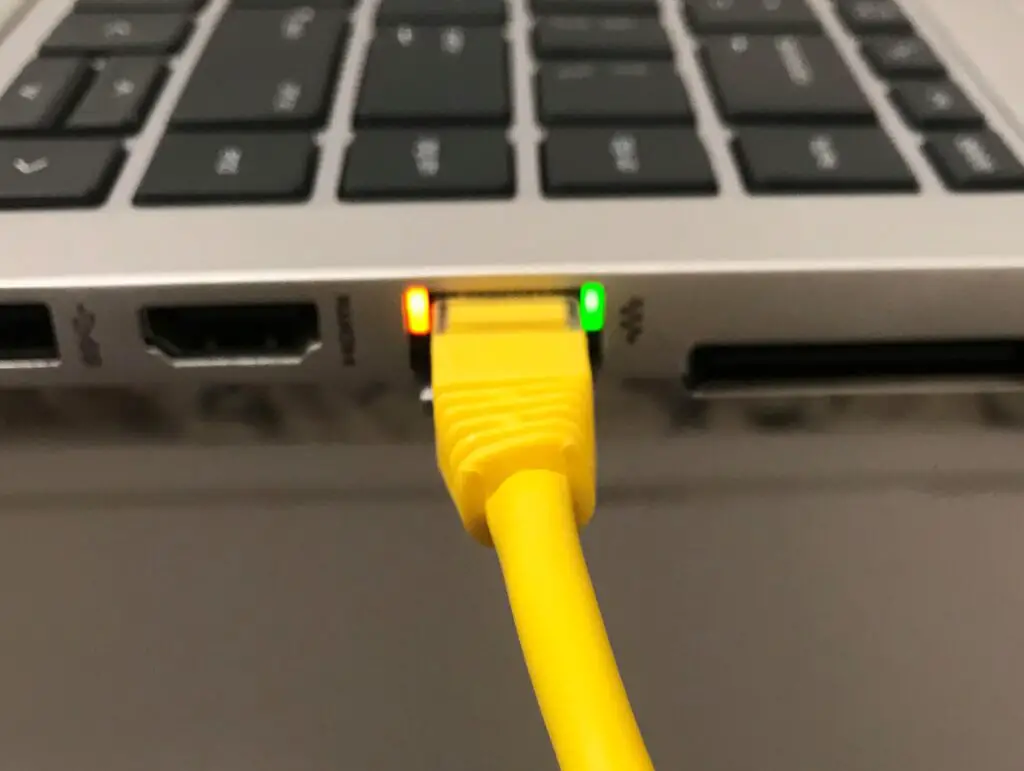
    Here’s what the ethernet port link lights look like on my laptop:

    Link lights on laptop ethernet port

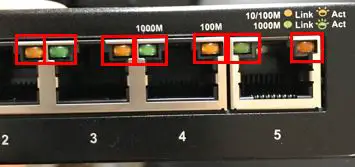
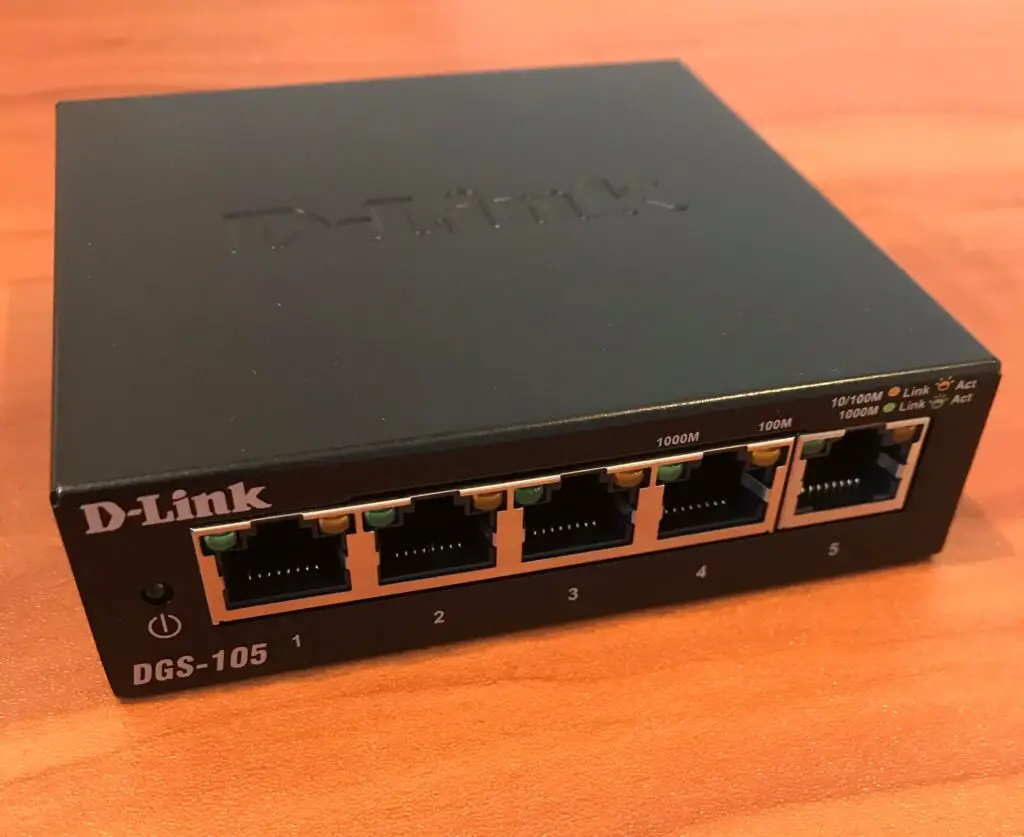
    If you have an ethernet switch in your home network, the ethernet link lights look about the same. You’ll just have more ethernet ports, and more link lights:

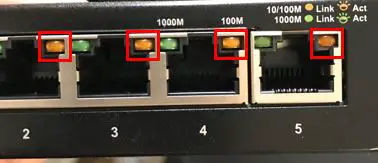
    Link lights on ethernet switch

    As you can see, each ethernet port has two link lights. These lights are usually in each of the upper corners of the port.

    Don’t worry, I’ll break down what each of these link lights means in the next section.

    One thing to take note of is the fact that the ethernet port link lights on my devices are different colors. The link light in the upper left corner is green and the light in the upper right corner is orange.

    In some cases, I’ve seen link lights that are both green instead of two different colors.

    If that’s the case in your home network, there’s no need to worry. Your link lights will still be useful to you. You just need to know what they mean.

    Speaking of which…

    What Does Each Ethernet Port Link Light Mean?

    Now that we know what we’re looking at, let’s make sure we can understand what these lights mean.

    It makes the most sense to take a separate look at the two devices in my home (laptop and switch). That’s because the configuration of their link lights is slightly different.

    We’ll start by breaking down what the link lights mean on my laptop.

    Link Lights Configuration 1: Laptop

    As I mentioned, my laptop has two differently colored ethernet port link lights. One light is green, and the other is orange.

    Connection Status Link Light

    We’ll start with the green light in the upper right corner of the ethernet port:

    Green ethernet port link light

    The purpose of this light is to indicate if your ethernet cable has a good connection to the device on the other end of the cable. In other words, it indicates if the laptop is successfully connected to another device or not.

    If your laptop has a good ethernet connection to another device (like your router) that’s powered on, the light will light up.

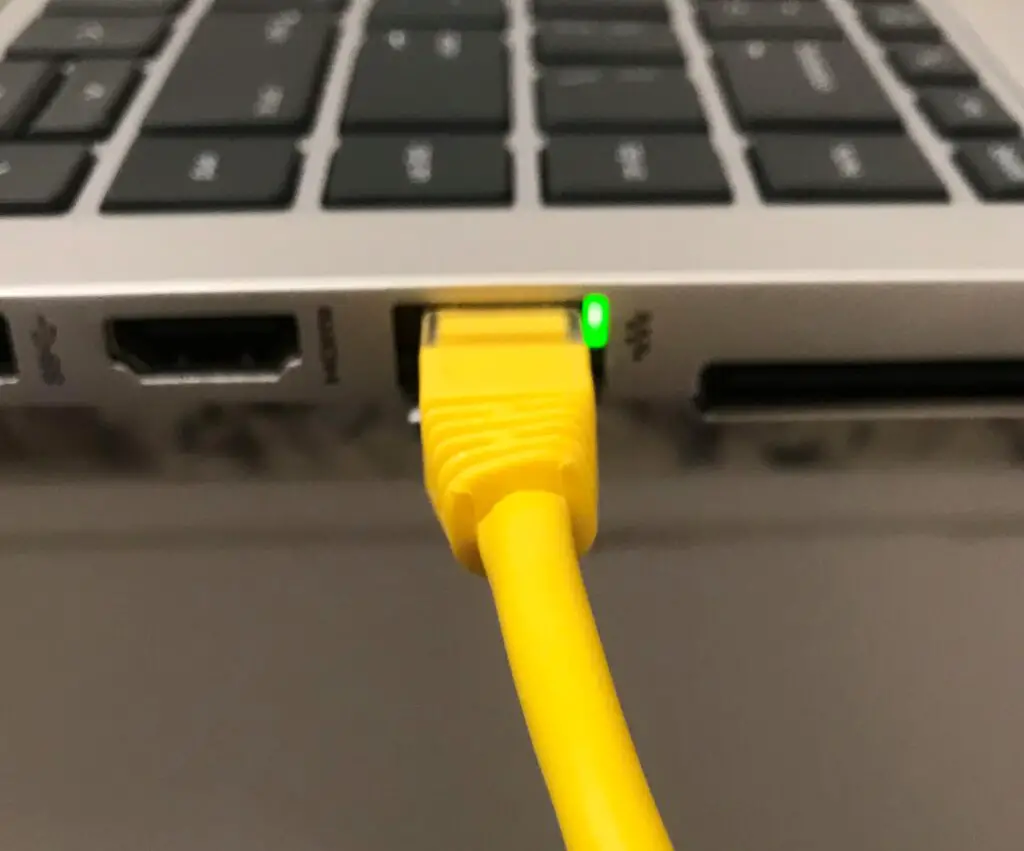
    Cat5e cable with green ethernet port link light on
    An ethernet port link light indicating a successful ethernet connection

    This light will stay illuminated as long as it has a good connection with the other device.

    If the ethernet connection with the other device is dropped, or the other end of the ethernet cable isn’t connected to another device, the light will be off.

    Cat5e cable with no ethernet port link lights on

    Why is this helpful?

    It’s useful because it’ll help you troubleshoot your network if the light is off. For example, if this light is off, it could indicate:

    • The other end of the ethernet cable isn’t connected to a device
    • The device on the other end of your ethernet cable is powered off
    • Your ethernet cable has gone bad

    This is information you wouldn’t have if you didn’t have a link light on your ethernet port.

    How to Identify Your Status Link Light

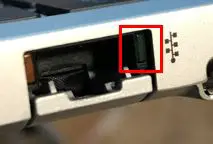
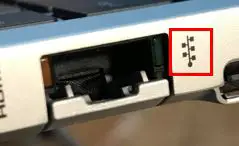
    A subtle hint to take note of is the symbol next to this link light:

    LAN symbol next to ethernet port link light

    This label is the universal symbol for a Local Area Network (LAN). It identifies that link light as one that’ll give you a status of the device’s LAN connection. In other words, it tells you if the device is connected to other devices in your local network.

    So even if the link light configuration on your devices is different, you know the light will give you the connection status of the device if it has a LAN symbol next to it,.

    Ok so we’ve got the first light covered. What about the other one?

    Activity Status Link Light

    Now let’s go over the link light in the upper left corner of the ethernet port.

    Orange ethernet port link light

    While the other link light is meant to tell you about the status of your device’s ethernet connection, this light will tell you about the activity related to your ethernet connection.

    To be more specific, it’ll tell you if your device is sending or receiving data over the cable at any given time. When your device is sending or receiving data via the ethernet cable, it’ll blink on and off.

    You can expect this light to continuously blink if you’re connected to the internet through this ethernet port. That’s because you’ll constantly be sending and receiving data through your cable.

    While this link light is repeatedly blinking, the status link light will remain lit. It’ll look something like this:

    Cat5e cable with both ethernet port link lights on

    The activity status link link is also helpful for troubleshooting.

    Let’s say your connection link light is on but the activity link light doesn’t blink while you’re surfing the web or transferring a file somewhere.

    This’ll give you an indication that maybe you’re connected to WiFi instead of using the ethernet cable. If this is what you see while you’re trying to transfer a file, maybe there’s a setting on your device that’s preventing the transfer from happening.

    You’ll know that nothing’s wrong with your ethernet cable if the connection status link light is on, so it must be something else that’s preventing the activity.

    This is the value of the activity status link light. It’ll point you in the right direction if things aren’t working properly with your ethernet connection.

    Link Lights Configuration 2: Ethernet Switch

    Now that we’ve covered one common configuration of ethernet port link lights, let’s look at another common configuration.

    For this configuration, we’ll take a look at my ethernet switch.

    My switch has 5 ethernet ports on it. Like the previous link light configuration, each port has 2 link lights over it.

    Ethernet switch

    Everything looks the same so far.

    The difference between the two configurations of link lights is how these lights are used. Let’s break these down one at a time as well.

    Green Status Light

    The first light we’ll go over is the green status light in the upper left corner of the port.

    Ethernet switch green link lights

    These lights are different from the connection status link lights on my laptop.

    That’s because they serve the purposes of both the connection status link light and the activity link light.

    How does this work, exactly?

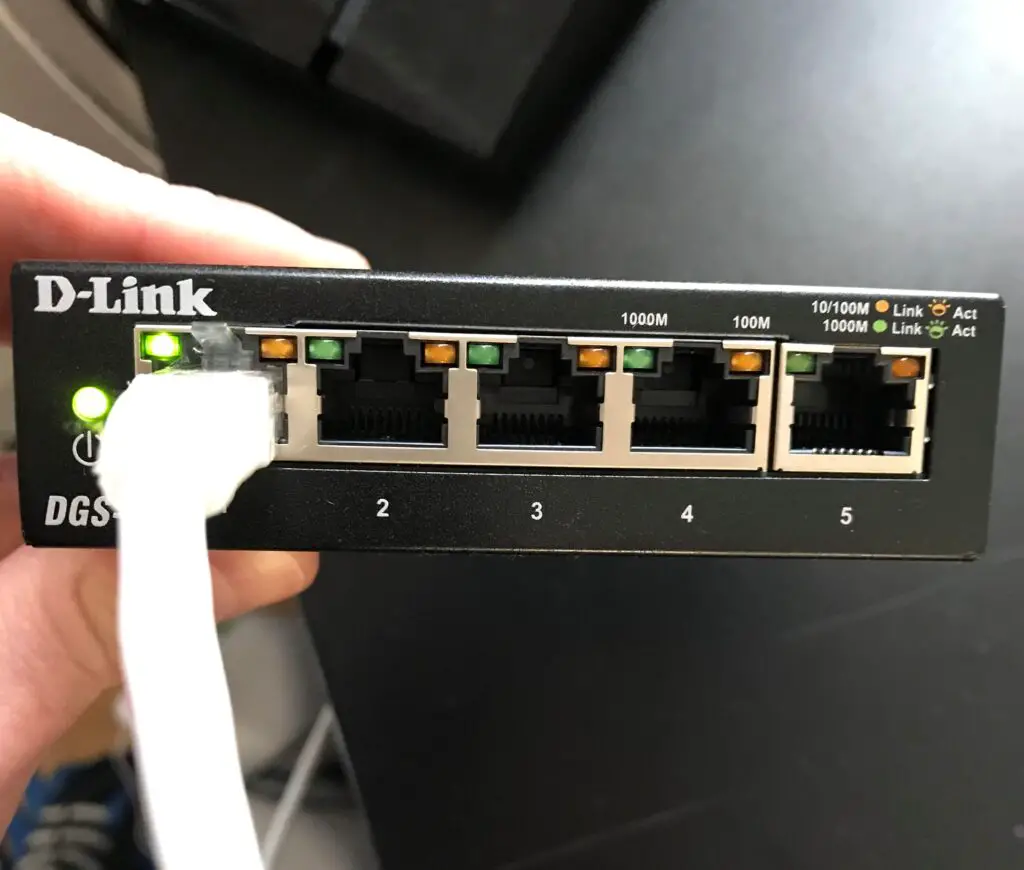
    In this configuration, the green status light will light up and blink when it has a good ethernet connection and it’s transferring data.

    Let’s look at a breakdown of the different states this light can be in. If the link light:

    • Doesn’t light up when an ethernet cable is connected to it, it doesn’t have a good connection
    • Is a solid green color when a cable is connected to it, it has a good ethernet connection
    • Is a solid green color and doesn’t blink when you’re transferring data, there’s something preventing your device from transferring data over that ethernet cable

    Here’s what it looks like when you have a good ethernet connection to the switch:

    Ethernet switch with green status light

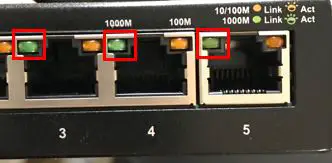
    If you look closely, you’ll see that the switch identifies these states as well.

    Ethernet link light status label

    A solid light indicates there is a good link (connection) with the ethernet cable. A blinking light indicates activity.

    So if the green light does all that, what does the orange link light do?

    Orange Status Light

    The orange status light in the upper right corner of each ethernet port functions the same way as the green one.

    Ethernet switch orange link lights

    With a good ethernet connection, the light will be a solid orange. If there’s activity over the ethernet port, it’ll blink orange.

    So how’s this any different than the green link light?

    The link lights themselves function the same. The bonus is that these lights provide more information about the status of the connection.

    They indicate the maximum transfer speed of the ethernet connection.

    Transfer Speed of Ethernet Connection

    In this configuration, the color of the link light that illuminates will depend upon the current ethernet connection to the port.

    Let’s go back to the label on the switch for more information.

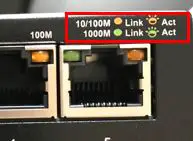
    Ethernet port link light speed label

    As you can see, the green light refers to a 1000M connection, while an orange light refers to a 10/100M connection.

    In this case, the “1000M” refers to 1,000 megabits per second (Mbps). This is the equivalent of 1 gigabit per second (Gbps). That means if the port’s current ethernet connection can support 1 Gbps, the link light will light up green.

    On the other hand, the “10/100M” label refers to a connection that can support either 10 Mbps or 100 Mbps. So if the current ethernet connection to the port can support a maximum of 10 Mbps or 100 Mbps, it’ll light up orange.

    The factors that determine which color light will light up are the devices that’re connected and the ethernet cable used to connect them.

    With that said, most modern devices have ethernet ports that can support 1 Gbps.

    On top of that, the commonly used ethernet cables today (cat5e or cat6 cables) can support 1 Gbps speeds as well.

    So if you have this link light configuration on one of your devices, chances are the green link light will always be lit instead of the orange one.

    If for some reason you have this configuration and the orange link light is on, you either have outdated ethernet cables or you’re connecting older devices.

    Should you determine that you have outdated ethernet cables, do yourself a favor and grab some new ones. If you don’t, it can slow the speed of your entire network.

    What Colors Should the Ethernet Link Lights Be?

    A common question I see about ethernet port link lights pertains to what colors you can expect.

    As I detailed above, this can depend upon the configuration of your link lights, as there are several configurations.

    With that said, it’s safe to say the color of the light is less significant. What’s important is whether the link lights are on or not. If they’re on, that’s usually a good sign.

    Link lights are usually meant to be one color (either orange or green), so if you see the link light on and/or blinking, that usually means things are working properly.

    A basic rule of thumb is that a solid link light will indicate a good connection, and a blinking light will identify activity over the ethernet cable.

    Don’t get hung up on the color of the light. Just make sure it’s acting how it should.

    Also keep in mind that your device might give you hints as to what the link lights are indicating. For example, the link light label on my switch indicates what the link light colors mean. This can be a helpful clue if you’re not sure what the lights mean.

    Wrap Up

    Hopefully this post answers any questions you have about your ethernet link lights. If you have additional questions, please leave a comment below.

    If you’re interested in learning more about similar topics, check out these other posts I’ve written:

    What is an Ethernet Switch Used for?

    Can an Ethernet Cable Slow Your Internet Speed?

    Do the Colors of Ethernet Cables Matter?

    Does Using an Ethernet Cable Matter for Gaming?

    What Does Cat Mean for Ethernet Cables?

  • Does Ethernet Cable Frequency Matter?

    Does Ethernet Cable Frequency Matter?

    Ethernet Cable Frequency Matter title page

    If you search online for an ethernet cable to buy, you get hit with a lot of terms and specifications.

    Take this ethernet cable for example. If you look at the title of the cable on Amazon, I count about 8 characteristics that are listed:

    • Cat6
    • Stranded
    • 550 Mhz
    • UTP
    • Pure bare copper wire
    • 24 AWG
    • 5ft
    • Black

    Getting hit with all these specifications at once can be overwhelming. It makes it really hard to pick out which ones are important, especially if you’re not super technical.

    What I found interesting is that of the 8 characteristics listed in the example above, two of them pertain to the frequency that the cable operates at.

    This immediately raises some questions.

    Does this mean frequency is an important characteristic of ethernet cables? Should you be paying attention to the frequency the cable supports when deciding which one to buy?

    Actually, the frequency of your ethernet cables is very important. The higher the frequency a given ethernet cable supports, the faster it can transfer data. The faster a cable can transfer data, the higher the maximum data transfer speed the cable will support.

    In this post, I’ll dive into everything you need to know about the frequencies of ethernet cables. I’ll talk about why the frequency supported by a cable is important, as well as what frequency you can expect when buying your ethernet cables.

    With that said, let’s take it from the top.

    What does frequency refer to in ethernet cables?

    Before we look at the different frequencies supported by ethernet cables, it’s important to have an understanding of what frequency means in this context.

    If you look up the definition of frequency, it’ll be defined as the number of repetitions of a periodic process in a unit of time.

    Ok, so what does that mean for ethernet cables?

    To answer this question completely, we’ll have to take a step back for a minute.

    How ethernet cables transfer data

    To understand how the frequency of an ethernet cable is measured, we need to first go over how they transfer data.

    Don’t worry, I’ll stay out of the nitty gritty technical details here.

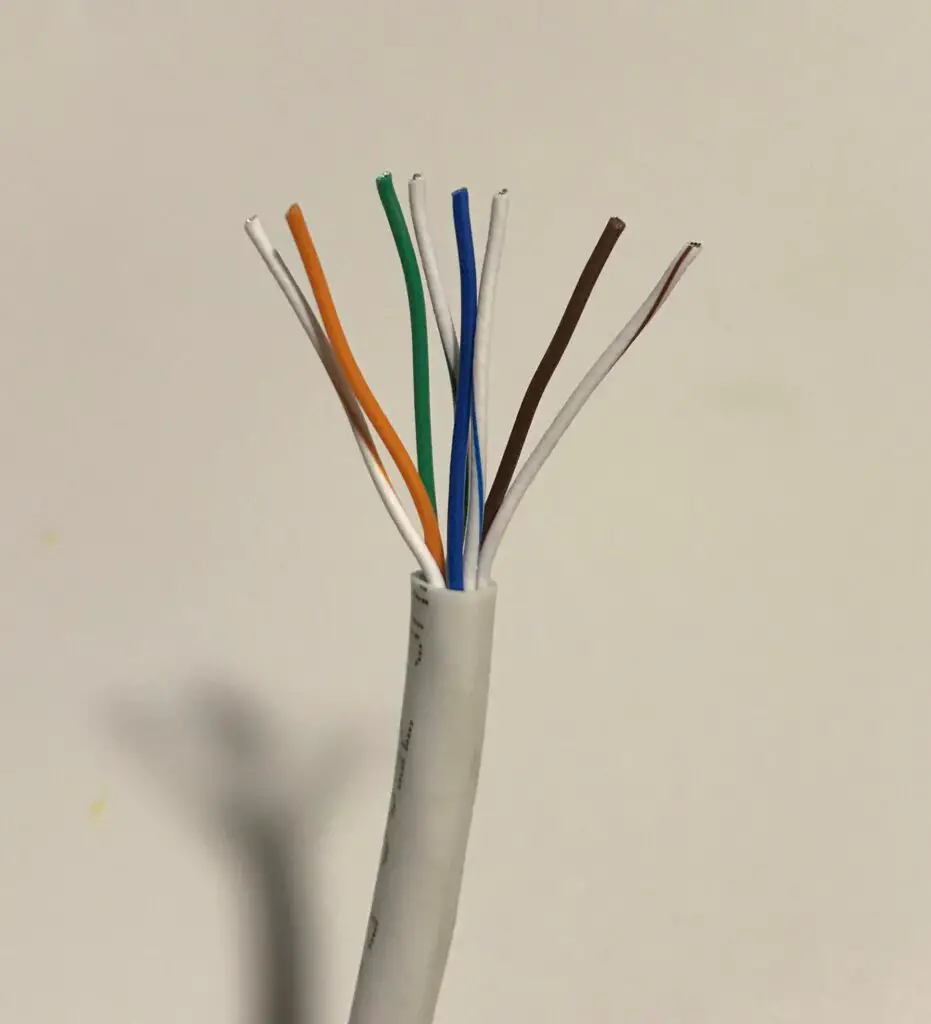
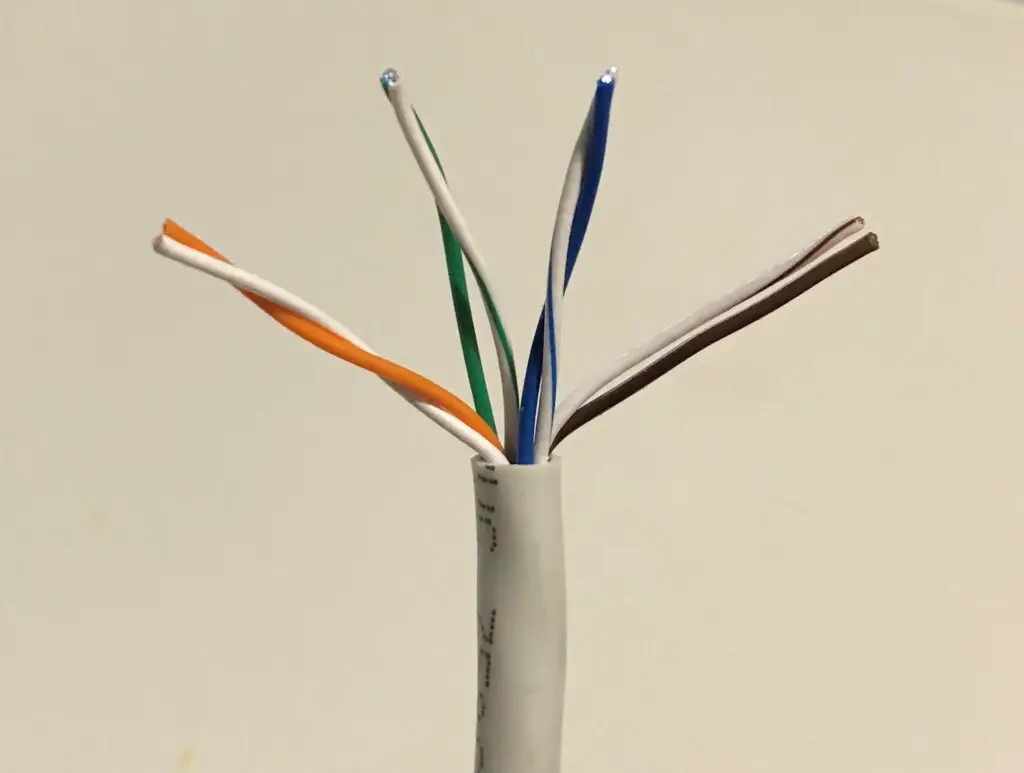
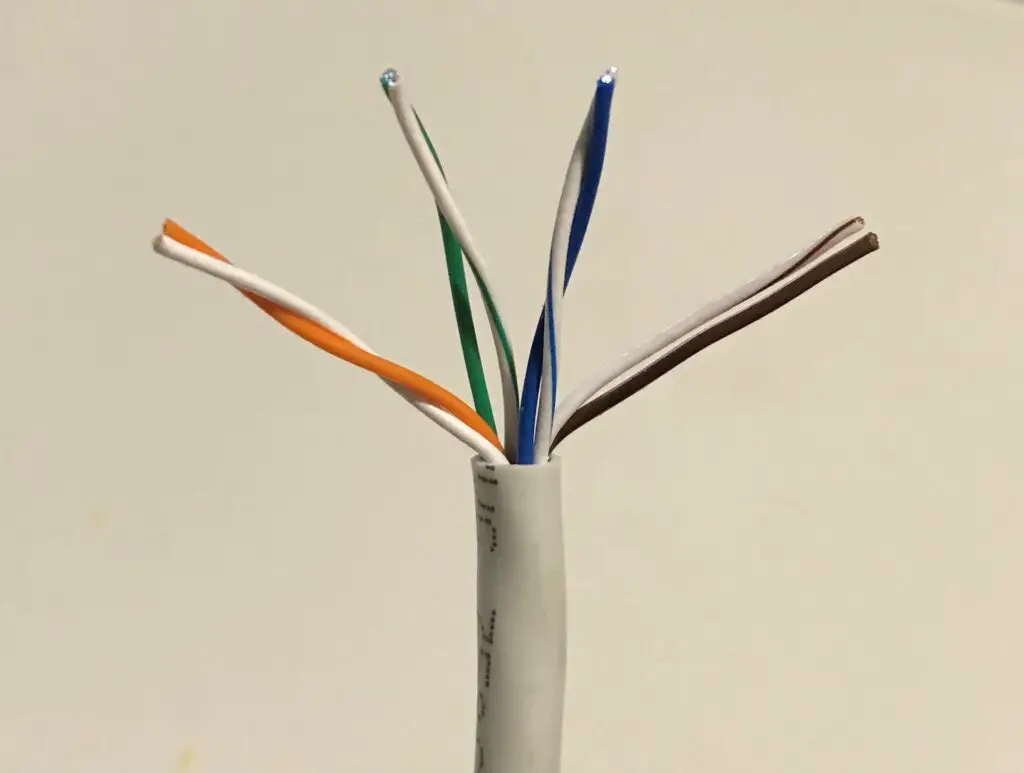
    To start, it’s important to know that your ethernet cables are made up of copper wires. Slice any of your ethernet cables open, and you’ll see they have 8 wires inside them.

    8 wires inside ethernet cable
    The wires that make up an ethernet cable

    These 8 wires are used to send and receive data from both ends of the cable. Data can move in both directions.

    Data is moved by sending electronic signals from one end of the cable to the other. This is why the wires inside your cables are copper. Copper is a good conductor of electricity.

    It’s almost as if they designed it that way on purpose.

    Anyway, back to the topic at hand.

    The other important piece of this is that computers and other devices speak to each other in 1s and 0s. This is called binary code. In other words, data passed from one device to another through an ethernet cable will be a series of 1s and 0s.

    Data is sent over ethernet cables with pulses of two separate voltages. One voltage represents a “0”, while the other voltage represents a “1”.

    As the device on the other end of the cable receives these voltages of electricity, it translates the voltages into binary data so it can understand the message.

    This is where the frequency of the cable is important.

    Why frequency is important for ethernet cables

    Ok, so data is sent over ethernet cables by sending pulses of two different voltages to the other end.

    Frequency refers to how fast your ethernet cable is able to do that.

    In ethernet cables, frequency refers to how many times the ethernet cable can change its state in 1 second. In other words, it describes how many times an ethernet cable change between the two pulses of voltage sent over its wires.

    To put this another way, think of your ethernet cable as an author.

    In this analogy, the frequency of your ethernet cable would be reflected by how fast the author can typee.

    The more words an author can type in a minute, the faster he or she will be able to finish their book.

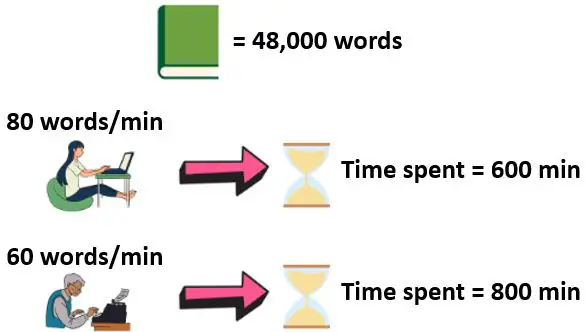
    If one author can write 60 words per minute, and another can write 80 words per minute (with the same quality), the writer that can write 80 words per minute will finish the book faster.

    How fast two authors can write a book example

    In this scenario, the author that can write 80 words per minute is the better choice.

    To bring this analogy back to ethernet cables, it’s easiest to think about an ethernet cable’s frequency as how fast a given cable can write.

    The more times it can change its state in 1 second, the faster it can write data.

    For the record, ethernet cables can write really fast.

    That’s why a cable’s frequency is measured by how many millions of times they can change their state in a second. The unit of measurement for ethernet cable frequency is Megahertz (MHz).

    Does your ethernet cable’s maximum frequency matter?

    Based upon the information above, it’s pretty easy to tell what you want in an ethernet cable.

    The higher the frequency it can support, the faster a cable can process data through it.

    The faster a cable can process data, the more data it can send in a given amount of time.

    The more data it can send in a given amount of time, the higher the data transfer speed it can support.

    I think you can see where this is going, right?

    The higher the frequency a cable can support (in MHz), the faster it can send data from one end of the cable to the other.

    What you’ll see when looking at ethernet cables is that frequency and the maximum data transfer speed supported by the cable go hand in hand. The higher the maximum frequency of a cable, the higher the maximum data transfer speed it’ll support.

    So how should you go about finding the ethernet cables that support the highest frequencies?

    This is actually easier than you think.

    That’s because each category of ethernet cable has a defined maximum frequency it operates at.

    Let’s take a closer look at the factor that determines the maximum frequency a cable can support.

    What affects the maximum frequency of an ethernet cable?

    Different categories of ethernet cables support different frequencies and speeds.

    The question is, what makes them able to do this? What is it about ethernet cables that determines the frequency and speed they can support.

    It all comes down to the copper wires inside the cables.

    As I previously mentioned, ethernet cables transfer data by sending pulses of electricity through the copper wires in the cable.

    The thicker these copper wires are, the more electricity they’re able to pass through them at a given point in time.

    The more electricity you can pack into a cable at a given point in time, the higher the frequency it can support.

    So does this mean cables that can support higher frequencies have thicker copper wires inside them?

    You bet it does.

    Copper wire standards

    The thickness of copper wires inside an ethernet cable is measured in American Wire Gauge (AWG).

    AWG ranges from 0000 AWG to 40 AWG. Calculating the AWG number of a wire is a little complicated, but all you need to know is that the higher an AWG number is, the thinner the copper wire is.

    In other words, 40 AWG is the thinnest standard size of a wire. 0000 AWG is the thickest.

    The AWG value refers to a single wire, so each of the 8 wires inside an ethernet cable will have the same AWG.

    AWG values

    Here are the AWG values for the ethernet cables commonly used today. I’ve excluded cat7 cables from this table because they aren’t widely used (I’ll explain this later on):

    CategoryAWG
    Cat5e24
    Cat624 or 23
    Cat6a23
    Cat822
    *Data source: Cable Express

    Unsurprisingly, the higher category ethernet cables have thicker copper wires inside them.

    One important note here is that these measurements of thickness don’t include the color-coded plastic insulation surrounding the wire. It only refers to the thickness of the copper wire itself.

    Here’s an example.

    Copper wires inside insulation

    If you look closely, you can see the copper wires inside the color-coded insulation. The thickness of those wires is measured and assigned an AWG value.

    That should give you an idea of how thin these wires really are.

    You should also note that small changes in AWG can lead to significant differences in the frequency (and speed) a cable can support.

    As you’ll see in the next section, a cat6 cable can support a maximum frequency that’s more than double what a cat5e cable can support. What’s crazy is that cat6 copper wires are only .05mm wider (.57mm versus .052mm).

    The point here is that making the copper wires in an ethernet cable only slightly thicker will greatly increase their performance.

    Speaking of performance, at this point I’m sure you’re wondering what frequency each category of cable supports.

    Let’s take a closer look.

    What is the frequency of each category of ethernet cable?

    Each category of ethernet cable has a specific set of characteristics that they’re made to.

    The specifications for each category of cable have been assigned and approved by the Electronic Industries Association and the Telecommunications Industry Association, also referred to as the TIA/EIA.

    By standardizing the manufacturing of ethernet cables, it ensures all cables are made the same way.

    This is why you can expect your ethernet cable to support a certain frequency, based upon the category of cable it is.

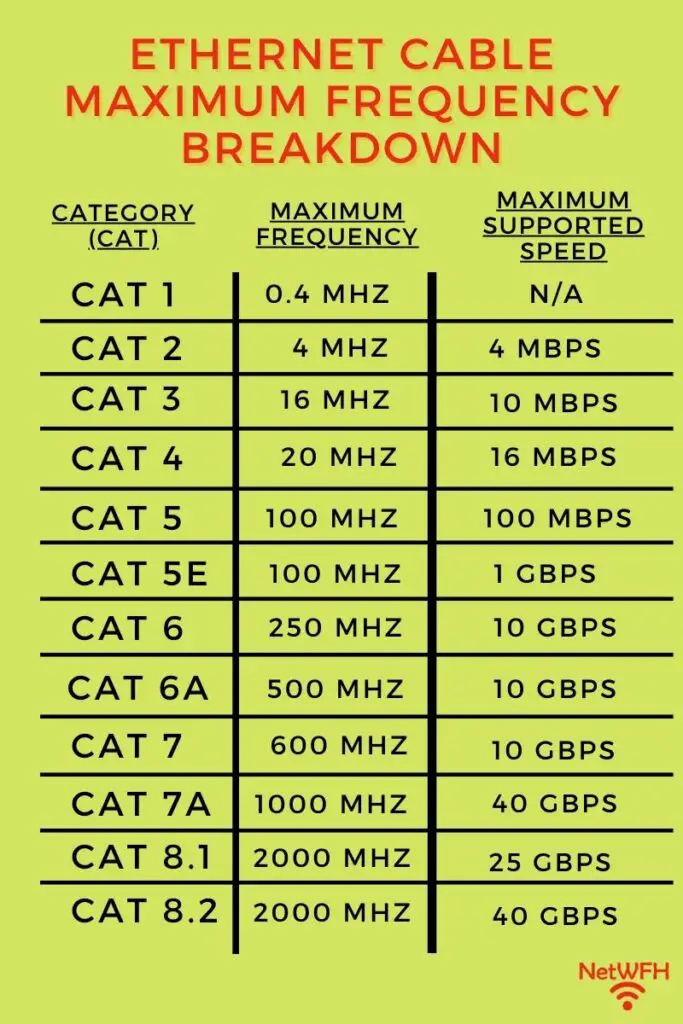
    With that, let’s break down what we can expect from each category of ethernet cable:

    Ethernet cable category frequency comparison

    As you can see, the results are just as I described earlier.

    The higher the frequency a cable can support, the faster the maximum speed it can support as well. You’ll see that as each category of cable increases, so does its supported frequency and speed.

    There are a few exceptions, however.

    Category 7 and 7a cables

    The exceptions to this are category 7 and 7a cables.

    Although these cables appear like they support speeds as fast or faster than category 8 cables at lower frequencies, there’s a catch.

    These categories of cables aren’t recognized by TIA/EIA as official categories of cables.

    In fact, in order to operate at the frequencies and speeds detailed in the figure above, category 7 and 7a cables wouldn’t be compatible with all the other categories of ethernet cables.

    I’ll spare you all the details here, but the bottom line is any cat 7 or cat 7a cables you see today will perform to the same specifications as category 6a cables.

    The main idea to take away from all this is that cables operating at higher frequencies will support faster speeds.

    So as long as you use ethernet cables that support the speed of your internet plan, you won’t really need to worry about the frequency it supports. You know it’ll be sufficient because of how closely linked the maximum frequency and maximum speed of ethernet cables are.

    Wrap up

    Now you know the importance of frequency when it comes to the performance of ethernet cables.

    The good news is that you don’t really have to worry about the frequency a cable can support when you’re buying your cables. In buying a certain category of ethernet cable, you’ll know the maximum frequency and speed it can support.

    If you found this information helpful, check out some other posts I’ve written about similar topics:

    Do the Colors of Ethernet Cables Matter?

    How Long Do Ethernet Cables Last?

    What Does Cat Mean for Ethernet Cables?

    How to Extend an Ethernet Cable

    Can Ethernet Cables Go Bad?

  • Does Using an Ethernet Cable Matter for Gaming?

    Does Using an Ethernet Cable Matter for Gaming?

    Ethernet Cable Matter for Gaming title page

    Listen, I get it.

    People take their gaming pretty seriously.

    When it comes to online gaming, players look for every advantage they can get over their competition. As a result, every piece of their gaming experience gets evaluated very closely.

    From graphics cards and RAM to keyboards and mice, no stone is left unturned.

    The least of which is a player’s internet connection.

    Not only is a player’s internet speed of vital importance to gaming experience (and performance), but how they connect to the internet is important as well.

    On this front, it comes down to one question: is it better to connect to the internet with an ethernet cable or over WiFi when gaming?

    When it comes to online gaming, you should use an ethernet cable to connect to the internet instead of WiFi. Not only will an ethernet cable provide you with a more reliable connection to the internet, but you will also experience less delay (also known as lag) while playing.

    In this post, I’ll detail why you should use an ethernet cable for your online gaming. I’ll also talk about what types of ethernet cables you should consider for your internet connection.

    Why an ethernet cable is better than WiFi for gaming

    As I mentioned above, there are several advantages to using an ethernet cable for online gaming instead of WiFi.

    Let’s take a look at the two major advantages that ethernet cables provide when it comes to gaming.

    Ethernet cables experience less delay

    Ethernet cables provide less delay than a wireless connection. That’s because you’re essentially connecting your device directly to the internet with a wired connection.

    So what does this mean, exactly?

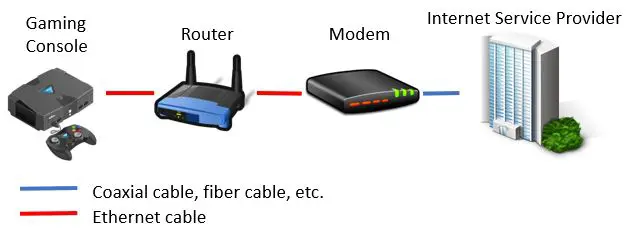
    Let’s say you have a gaming console that you want to provide with an internet connection.

    To do this, you need to plug one end of the ethernet cable into the gaming console. The other end gets plugged into your router.

    Now let’s look at what your router is connected to. Your router will be connected to your modem with another ethernet cable (unless you have a modem router combo).

    Taking it one step further, your modem will be connected to your internet service provider (ISP) with another cable. This cable won’t be an ethernet cable, but it’ll still provide a wired connection to your provider.

    If we zoom out on this picture, your gaming console is connected to your ISP with all wired connections.

    Gaming console wired connection

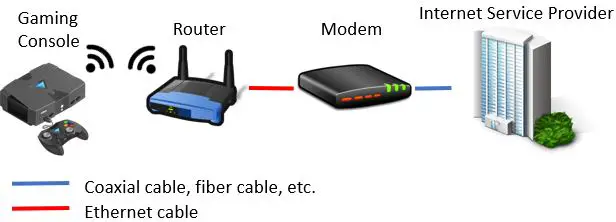
    Now let’s see what it looks like if you connect your gaming console to the internet with a wireless connection:

    Gaming console wireless connection

    Although the two diagrams above may look similar, the way you connect your gaming system to the internet can make a big difference.

    The reason for this difference has to do with the speed of data when transferring it over a cable versus through the air.

    Data transmission in wired and wireless connections

    When you send data over the air in a wireless internet connection, a lot more is happening between your device and the internet.

    I’ll try not to bore you with the technical details here.

    When using a wireless connection, your data needs to be translated into a different format (from digital to analog) before it can be sent to your gaming system.

    This is done by your router.

    Once the data arrives at your gaming system, it needs to be translated back into a format that your device can understand (digital).

    This same translation happens when your system needs to send data to the internet. For example, when you move your joystick during gaming, there’ll be a few millisecond delay before you see a response on your screen.

    These milliseconds of delay are caused by the translation activities that happen when sending data in a wireless internet connection.

    This isn’t a lot of time, but every millisecond counts if you take your online gaming seriously.

    Conversely, no data translation is needed when sending data over a wired connection.

    To put it another way, any time spent translating data and sending it through the air over WiFi is time saved by a wired connection.

    That’s why data will travel to and from your gaming system with less delay over a wire instead of through the air. Each time data is sent wirelessly to your console, you have to wait for the data translation to happen.

    That’s where ethernet cables provide a distinct advantage.

    Ethernet cables provide a more reliable connection

    Another major benefit of using ethernet cables to connect to the internet is that these connections are very reliable.

    Simply put, when you directly connect devices, there’s less that can go wrong with the connection. Sure, you can have an ethernet cable go bad, but that won’t be a common occurrence if you take care of your cables.

    In a wireless connection on the other hand, there’s a lot more that can go wrong.

    Depending upon how far your console or gaming PC is from your router, it may experience a poor internet signal. This can lead to disruption in your internet connection.

    It can also be an issue if you have multiple devices trying to wirelessly communicate with your router at the same time. Your router can get overwhelmed and your system’s connection to the router can get dropped.

    Lastly, if you’re not careful, your wireless signal can get interfered with or blocked. This also depends upon where your gaming system and router are in relation to each other. To give a few examples, common household materials like metal and concrete are known to disrupt wireless signals in your home.

    These are all things you don’t have to worry about with a wired connection. As long as your gaming system and router remain connected with an ethernet cable, you’ll have a strong signal.

    When you’re gaming online, the last thing you want is your internet connection to get disrupted. The bottom line is that there are a lot more ways this can happen with a wireless connection.

    Do yourself a favor and connect your gaming console with an ethernet cable.

    Is using an ethernet connection faster than Wifi?

    I know what you’re thinking.

    I just talked about the benefits of using ethernet cables instead of Wifi, but I didn’t say anything about the speed of the connections.

    There’s actually a good reason for that.

    That’s because both ethernet cables and Wifi connections should provide you with the speed you need to game effectively.

    Let’s take a closer look.

    Internet speed required for online gaming

    When it comes to online gaming, you might be surprised to hear that you don’t need a blazing fast internet connection.

    In fact, most sites say that you only need about 5 megabits per second (Mbps) of internet speed to game online.

    So what does this mean for you?

    It means that as long as your internet connection is faster than 5 Mbps, speed won’t be an issue for you when gaming. In other words, whether you’re connecting to the internet with an ethernet cable or a WiFi connection, as long as the connection (and internet plan) can support a speed of 5 Mbps, speed won’t be a factor when you’re gaming.

    This situation is like a motorized scooter on a road.

    Example

    Let’s say you have a motorized scooter with a top speed of 5 MPH. With this scooter, you’ll be able to drive it on any road with a speed limit greater than 5 MPH without having to slow down.

    With that said, whether the speed limit is 50 MPH or 100 MPH, the speed you’re traveling will never be faster than 5 MPH. A faster speed limit won’t make your scooter any faster than it’s designed to go.

    Scooter driving on a road with different speed limits

    So as long as the speed limit is greater than 5 MPH, you’ll be able to scoot along at full throttle without having to slow down.

    In this example, the motorized scooter represents the speed needed for you to game online without any issues (5 Mbps). The speed limit is the maximum speed provided by your internet connection method.

    As long as your method of connecting to the internet provides faster than 5 Mbps of speed, you’ll be able to game at top speed without restriction.

    The point of this story is: the maximum speed supported by a WiFi or ethernet connection to the internet doesn’t really matter. The connection just needs to provide a connection of more than 5 Mbps.

    It’s safe to say that any modern WiFi or ethernet cable connection will support speeds faster than 5 Mbps. In order for this to happen, your internet connection will need to support speeds greater than 5 Mbps as well.

    Most minimum internet plans today support speeds of at least 25 Mbps, so you should be with most internet plans.

    Maximum supported speed is not a factor

    In the end, it’s not really a question of which method of connecting to the internet supports a faster maximum speed. Both connection methods provide adequate speed for gaming. What’s really important is which method provides you with the necessary data faster.

    As I mentioned above, ethernet cables do that because there’s less delay when sending and receiving data.

    For those interested, I ran an experiment with Wifi and ethernet connections to see for myself. It was this experiment that confirmed for me that both connections will provide adequate speed for gaming.

    All you need to do is make sure you have a suitable internet plan and you’re using modern internet equipment.

    Which ethernet cable is best for gaming?

    Using an ethernet cable to connect to the internet is the way to go when gaming online.

    But the question is, what ethernet cable do you need?

    There are multiple categories of ethernet cables to choose from. Each category of cable will support a different maximum speed.

    So should you just buy the cables that support the fastest maximum speed?

    Ethernet cable category comparison

    As we discovered in the previous section, the maximum supported speed of the cable doesn’t really matter. It just needs to be fast enough to support your internet plan and the speed required for gaming.

    This is the biggest issue I’ve seen with other sites that recommend ethernet cables for gaming. Many of them will suggest that category 8 cables are the best for gaming because they support the fastest maximum speeds.

    This is overkill for just about anyone. Unless of course you run a datacenter out of your house.

    From my perspective, your best move here will be to get an ethernet cable that’ll support your internet needs for the foreseeable future. After all, if you don’t get the right ethernet cable, it can limit your internet speed.

    A conservative approach here is to buy category 6 cables. These cables support speeds up to 10 gigabits per second (10 Gbps). This’ll be more than enough for any current internet plan you may have.

    Another benefit of buying cat 6 cables is that they’ll allow you to upgrade your internet plan in the future without having to worry about your ethernet cables not being able to support your internet plan.

    With that said, if you have a slower internet plan and don’t plan on upgrading any time soon, category 5e cables will work just fine.

    Is a cat 7 cable good for gaming?

    You may have noticed that I didn’t suggest using category 7 cables for gaming.

    There’s actually a good reason for this.

    To make a long story short, it’s because they provide the same performance as category 6 cables. There’s no benefit to using them instead of cat 6 cables.

    You may find that cat 7 cables cost more, however.

    There’s a lot going on with category 7 cables, so I won’t get into all the specifics here.

    Essentially what you need to know is that cat 7 cables:

    • Provide the same performance specifications as cat 6 cables
    • Aren’t recognized by the same standards group (ANSI/TIA) that all other cables are recognized by
    • Were originally designed to use a different connector than all other categories of cables
    • Haven’t been widely adopted due to their lack of backwards compatibility

    What’s interesting is if you look for cat 7 cables online, they’re much harder to find than other common cable categories.

    The ones you find (like these), however, will have the same connectors (RJ45) as all the other categories of cables. Once it was obvious that category 7 cables weren’t going to be widely adopted, they started being sold with these connectors so people will buy them.

    Just be aware that these cables will perform exactly the same as category 6 cables.

    If you were thinking about buying a category 7 cable, buy a cat 6 cable instead.

    Do you lose gaming speed with a longer ethernet cable?

    Ok so you’ve decided to pick up cat 5e or cat 6 ethernet cables.

    The next common question here is how the length of the cable affects your gaming performance.

    You’ll be happy to hear the length of the cable probably won’t matter. It’ll only affect your gaming performance if your cable is extremely long.

    How long am I talking, exactly?

    If you refer to the graphic above, you’ll be in good shape as long as your cables aren’t longer than 328 feet. If an ethernet cable is over 328 feet, your connection will get disrupted and you won’t get good performance out of it.

    Outside of an office building, I don’t think I’ve seen an ethernet cable that comes even close to that length.

    So the bottom line is: pick up the length of cable that makes your home setup most convenient. Your gaming performance won’t suffer if it’s a longer cable.

    Wrap up

    Now you know the value of using ethernet cables when gaming online. If you have any questions about this material, please drop a comment below.

    If this was useful information for you, check out some other posts I’ve written about similar topics:

    Are Ethernet Cables Backwards Compatible?

    Do the Colors of Ethernet Cables Matter?

    What Does Cat Mean for Ethernet Cables?

    Is a LAN Cable an Ethernet Cable?

    Are Ethernet and Phone Cables the Same?

  • What Are Ethernet Cable Pinout Standards?

    What Are Ethernet Cable Pinout Standards?

    Ethernet Cable Pinout Standards title page

    Ethernet cables seem like the most basic devices in your home network. They’re cables that you connect to the devices in your office or home, and they give you a connection to the network.

    On top of that, they all look alike (although they might be different colors).

    Just when you let your guard down and get overconfident about them, you learn that there’s way more to them than you first thought.

    For example, you might be surprised to hear:

    And that’s just scratching the surface.

    Another ethernet cable term that may have caught you off guard is pinout standards.

    What exactly does this term mean, and how does it apply to ethernet cables?

    Hopefully I can help sort this out for you.

    Ethernet cable pinout standards detail the order of wires inside an ethernet cable’s connectors. This standardization ensures that ethernet cables and devices they connect to are all compatible with each other.

    In this post, I’ll detail all you need to know about ethernet cable pinout standards. I’ll also answer some frequently asked questions about them.

    Where did ethernet cable pinout standards come from?

    Ok, so we’ve established that pinout standards establish how ethernet cables are wired.

    There are a few natural follow up questions to this.

    Firstly, who said these are the standards that should be followed when making cables? And why were they chosen to make the rules?

    Truth be told, the cable pinout standards came from a collaborative effort.

    The name of the standard that details how ethernet cables should be wired is called ANSI/TIA-568.

    This standard was published by the Telecommunications Industry Association, which is where the “TIA” in the standard comes from. The “ANSI” stands for the American National Standards Institute, which is the group that signed off on the standard that TIA put forth.

    These groups may not sound like a big deal, but they actually carry a lot of weight in developing different standards for industry.

    After all, the whole purpose of ANSI is to develop standards in a wide variety of areas.

    For the ANSI/TIA-568 standard, more than 60 groups worked together to come up with it. These groups consisted of different industries and professions (e.g. consultants, telecommunications companies, banks, etc.). Developing it with so many people involved ensured that everyone was on the same page.

    With so many influential companies involved in the creation of the standard, it’s no surprise that it was widely adopted.

    Why are pinout configurations needed in the first place?

    Now that we’re done paying our respects to those who developed the standard, let’s dig a bit deeper.

    Why are ethernet cable pinout standards needed in the first place?

    That’s because when it comes to ethernet cables, communication is extremely important (pun intended).

    The reason this standard is so important is because there’s actually quite a lot going on inside an ethernet cable.

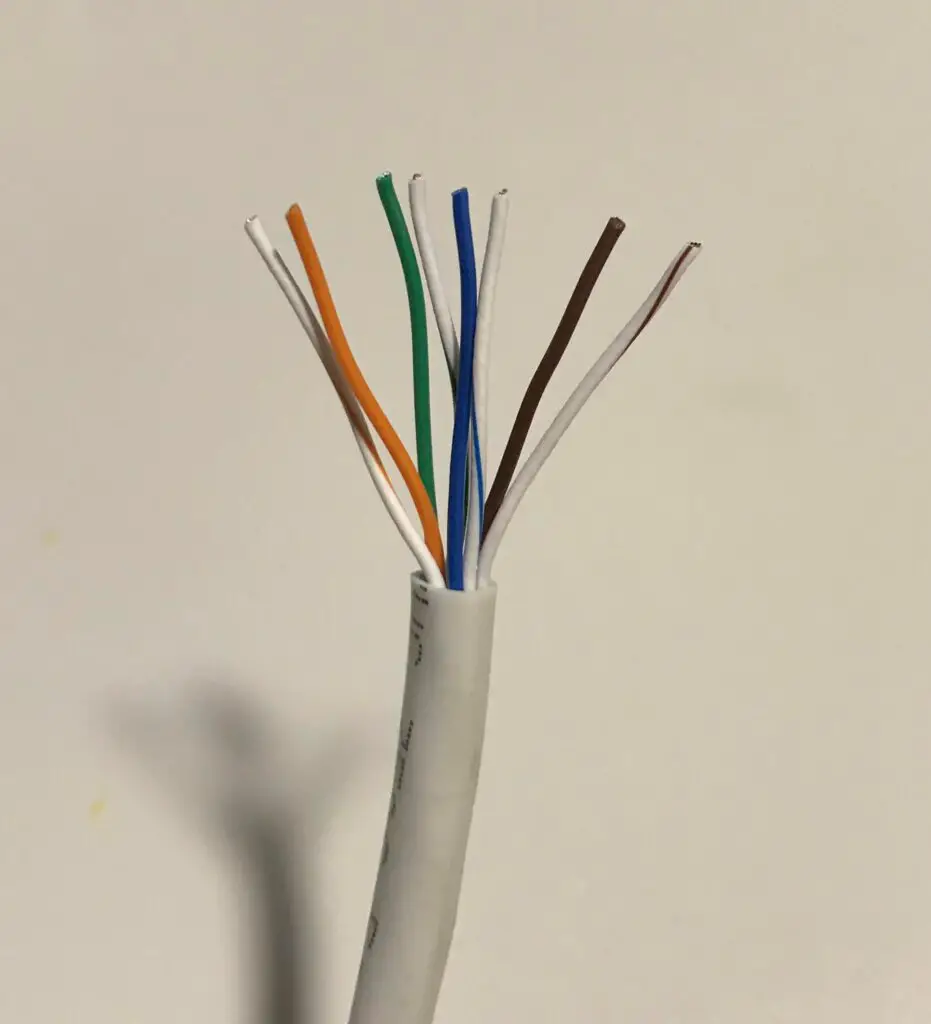
    Inside an ethernet cable, there are 8 copper wires. Each wire is assigned a different color for identification purposes.

    8 wires inside ethernet cable
    Copper wires inside an ethernet cable

    These wires are used to move data back and forth between both ends of the cable. The data is moved using pulses of electricity through the wires.

    Some of these wires are meant to send data, while others are meant to receive data. There are even some wires that don’t have any job at all.

    The best way to think of this is a highway.

    You have some cars traveling in one direction, while other cars are traveling in the other direction. If you don’t have a standard in place that explains which lanes are used for each direction, you’re setting yourself up for disaster.

    Taking this analogy a step further, imagine if each town or city had different rules in place regarding which lane to drive in depending upon the direction you were going in.

    Not a pretty picture, is it?

    This is where the ANSI/TIA-568 standard is so helpful. It helps identify which wires are meant to send data to the other side of the cable, and which are used to receive data from the other side.

    With all cable and device manufacturers following the same standard, it ensures everyone is using the same rules of the road. This makes data travel easier for all parties involved.

    What are the pinout configurations?

    As I mentioned earlier, inside an ethernet cable each wire has a specific role. The role of each wire is determined by its position inside the RJ45 connector at the end of it.

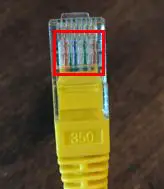
    For those of you that may not be familiar, these are the 8 wires of an ethernet cable inside an RJ45 connector:

    Wires inside an RJ45 connector

    As you can see, the 8 wires are side-by-side in the RJ45 connector. The fact that each of these wires is a different color makes things much easier.

    So how do you know what order the colors go in?

    These positions are defined in the ANSI/TIA-568 standard.

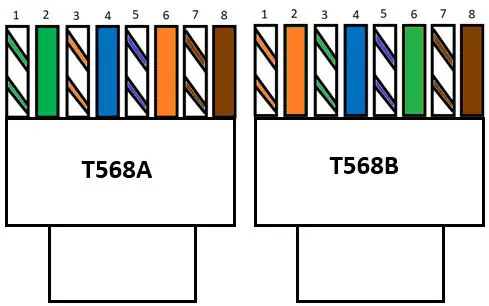
    The standard provides two different pinout configurations that can be used inside an RJ45 connector. These pinouts are called T568A and T568B.

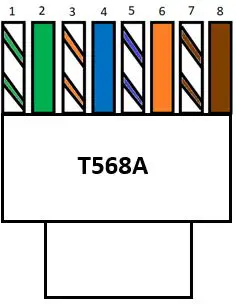
    T568A pinout configuration

    Here’s what the T568A pinout configuration looks like (when the tab of the RJ45 connector is facing away from you):

    T568A pinout configuration

    With a T568A wiring configuration, the wires are in the following order from left to right:

    • White with a green stripe
    • Green
    • White with an orange stripe
    • Blue
    • White with a blue stripe
    • Orange
    • White with a brown stripe
    • Brown

    T568B pinout configuration

    Here’s what the T568B pinout configuration looks like (again with the RJ45 connector tab facing away from you):

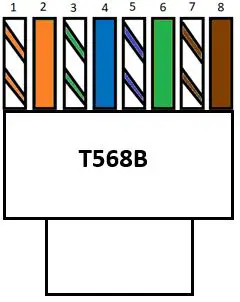
    T568B pinout configuration

    In a T568B pinout configuration, the wires are in the following order from left to right:

    • White with an orange stripe
    • Orange
    • White with a green stripe
    • Blue
    • White with a blue stripe
    • Green
    • White with a brown stripe
    • Brown

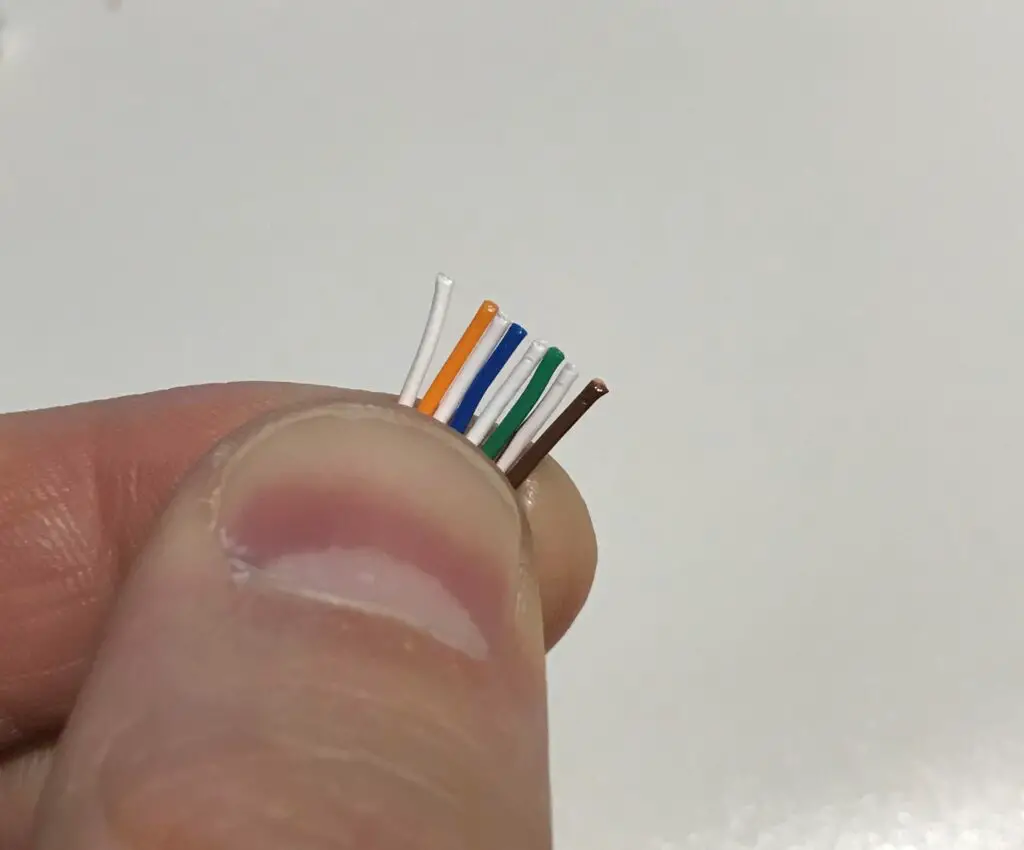
    To make it easier to see, here’s what a T568B pinout configuration looks like before it goes inside an RJ45 connector:

    T568B wire pinout outside of RJ45 connector

    Please note that although you can’t see them, the white wires have colored stripes on them. They’re not all white. You have to trust me on this one.

    Ok, there you have it.

    Those are the two standards for wiring your ethernet cables. As long as the wires follow one of the two configurations, your cable should work just fine.

    What is the difference between the T568A and T568B configurations?

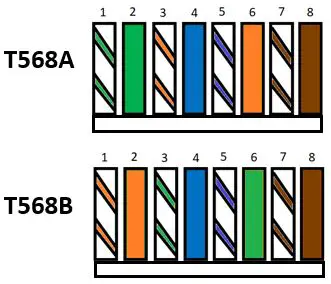
    To identify the differences between the T568A and T568B configurations, let’s take a closer look at the order of the wires in each case.

    T568A and T568B wiring comparison

    At first glance, it might look like these configurations are quite different.

    In reality, the only difference between the two is that the green and orange wires are switched in the two different configurations. This includes the striped wires for these colors as well.

    In other words, if you take every orange wire in a T568A configuration and replace it with a green wire of the same type (solid or striped) and vice versa, you’d get a T568B configuration.

    So why is there more than one way to configure the wires in the first place?

    That’s a good question. Let’s dive into it.

    Why are there two different pinout configurations?

    Let me start by saying that when ethernet cable pinout standards were developed, we were in a different age of computers.

    Over the years, things have been simplified when it comes to your ethernet cables.

    The reason there are two different pinout configurations has to do with the fact that you used to need different cables to connect different types of devices.

    For example, if you were using your ethernet cable to connect two computers, it would need to be wired one way. If you were using an ethernet cable to connect your computer and a router, it would need to be wired a different way.

    Long story short, this led to the development of two different types of ethernet cables.

    The cables used to connect two different types of devices (e.g. a computer and an ethernet switch) were called straight through cables, while the cables used to connect two of the same type of device (e.g. two computers) were called crossover cables.

    The details about these cables are less important in this discussion, but it explains why two different pinout configurations exist.

    The bottom line here is that ethernet cables needed to be wired differently based upon the devices they were connecting.

    With that said, you no longer need to worry about what ethernet cable you’re using when connecting two devices.

    Due to advancements in technology, our devices are smart enough to recognize the type of device they’re connecting to. As long as the ethernet cable is wired to either of the standard pinout configurations, you won’t have any problems.

    Can you use T568A and T568B configurations in the same cable?

    For those of you that decide to make your own ethernet cables, there’s a common question I’ve seen that we should cover here.

    As we’ve discussed, an ethernet cable will function properly as long as the ethernet cable is using one of the two standard pinout configurations.

    But would the cable still work if you used one pinout configuration for one end of the cable and the other pinout configuration for the other end?

    In other words, what if one end of the cable had a T568A configuration and the other had a T568B configuration. Would a cable that looked like this still work?

    Ethernet cable with T568A and T568B pinout configuration

    You bet it would.

    This is actually the configuration of a crossover cable that I mentioned in the previous section.

    In fact, if you’re making your own ethernet cables you could use any of the following combinations of pinout configurations:

    • T568A and T568A
    • T568A and T568B
    • T568B and T568B

    Hopefully you get the picture here.

    This hammers home the point that any combination of standard pinout configurations will work fine with your ethernet cables.

    Should I use T568A or T568B?

    With several different combinations of pinout configurations to choose from in your ethernet cables, it begs the question: is there one pinout configuration that’s better than the others? Will one pinout configuration provide better performance than the others?

    The simple truth is it doesn’t matter. You won’t get better performance out of your cable by choosing one pinout configuration over another.

    With that said, you’ll find that many of the cat5e and cat6 ethernet cables you can buy online will have a T568B configuration.

    In changing the lengths of some of the ethernet cables in my network, I found all of them to have T568B configurations.

    Again, it doesn’t make any difference which one you choose. Just know that if you pick T568B configurations you’ll be going with the majority.

    Ultimately the choice is yours.

    You can be a rebel and use the T568A configuration, or you can follow the popular choice and go with a T568B configuration.

    Wrap up

    That just about covers ethernet cable wire pinout configurations.

    If you have any questions about ethernet cable pinout configurations, or you’d like to share your experiences with ethernet cable pinout configurations, I invite you to drop a line below.

    If you’re interested in learning more about similar topics, check out these other posts I’ve written:

    Are Ethernet Cables Backwards Compatible?

    Do the Colors of Ethernet Cables Matter?

    How Do You Crimp Ethernet Cables?

    What Does Cat Mean for Ethernet Cables?

    The Difference Between Cat5e and Cat6 Cables

  • Are Ethernet Cables Backwards Compatible?

    Are Ethernet Cables Backwards Compatible?

    Ethernet Cables Backwards Compatible title page

    Are you looking to replace ethernet cables in your home network?

    If so, you’ll probably need to answer some important questions before making any decisions.

    You’ll need to know:

    In addition to the information above, you’ll need to determine if the cables you want to buy are backwards compatible with the ones you’re replacing.

    I know, this can feel overwhelming.

    So let’s start at a high level: are ethernet cables backwards compatible?

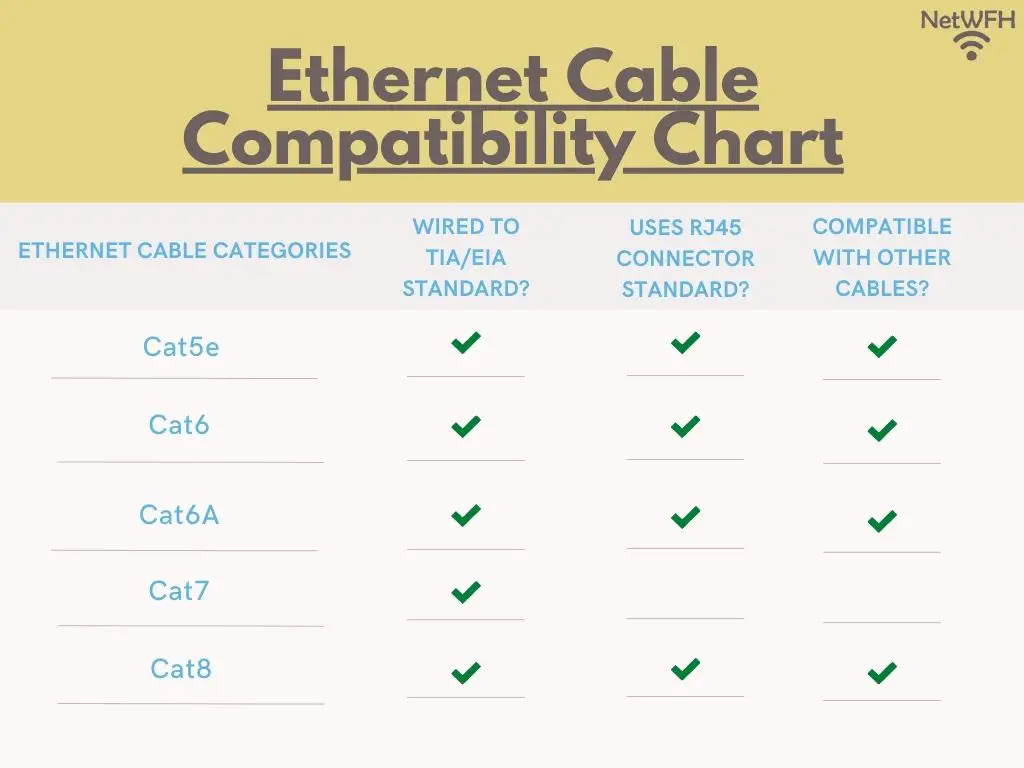
    The good news is that most ethernet cables commonly used today (cat5e, cat6, cat6a, and cat8) are backwards compatible with each other. The exception to this is cat7 cables.

    In this post, I’ll go into detail about why these cables are backwards compatible. I’ll also talk about why you’ll want to avoid using cat7 cables in your network.

    How to tell if an ethernet cable is backwards compatible

    When it comes to identifying the ethernet cables that are backwards compatible, there’s one basic specification to pay attention to.

    The specification that we care about the most has to do with the connectors at the ends of the cable.

    To be specific, I’m talking about these:

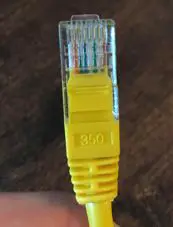
    Ethernet cable RJ45 connector

    The picture above is an RJ45 connector.

    RJ45 is an ethernet cable standard that describes how an ethernet cable terminates at each end. In other words, it identifies the type of connector at each end of ethernet cables.

    The “RJ” stands for “registered jack”, and the “45” is just an identifier for the interface standard of the connector. Essentially, the purpose of the RJ45 connector standard is to provide a way for everyone to make cables the same way.

    On the other side of the coin, it makes it easy for companies making computers, gaming systems, and other devices to make their devices compatible with the standard. All they have to do is add a port on their device that fits the RJ45 standard.

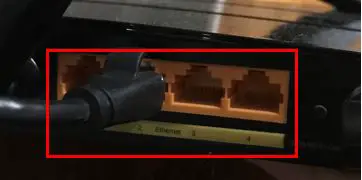
    That’s why you’ll find RJ45 ports on most of your electronic devices. For example, my router has 4 ethernet ports on the back of it that are for RJ45 connectors.

    Ethernet ports on router

    The RJ45 standard is universal. Everyone uses it.

    Well, almost everyone. Unfortunately, not every ethernet cable adopted the RJ45 standard.

    To bring this all together, the cables that are backwards compatible with each other will all be made to the same RJ45 connector standard.

    So which ethernet cables have connectors made to this standard?

    I’m glad I asked.

    Which cables use RJ45 connectors?

    Ok, so we’ve determined that the cables that are backwards compatible will have RJ45 connectors.

    The good news here is that most ethernet cables used today are made to that standard of connector.

    To be specific, the following categories of cables have RJ45 connectors on them:

    • Category 5e
    • Category 6
    • Category 6A
    • Category 8

    So what does this mean, exactly?

    It means you can replace any of the above cables with a different category of cable without any issues, so long as the cable you’re replacing it with is also in the list above. For example, you’ll have no problem replacing a cat5e cable with a cat6A cable.

    Although the cables listed above are most of the ethernet cables you’ll see today, it’s important to note that not all categories of ethernet cables are compatible with each other. As you’ll find more about later, category 7 cables aren’t compatible with the cables listed above.

    You may be wondering if categories 1 through 4 of ethernet cables are backwards compatible. To be honest, I left them off the list above because you won’t see them used today.

    They don’t support speeds fast enough to keep up with the demands of today’s networks. It’s sad, but the truth is they’ve been left behind at this stage of the game.

    What makes ethernet cables backwards compatible?

    Ok, so ethernet cable categories 5e, 6, 6A, and 8 are all interchangeable with each other.

    We also know that the reason they’re compatible with each other is because they all have RJ45 connectors.

    This only tells a part of the story, however. To find out exactly why these cables are compatible, we have to dig a layer deeper.

    That’s right, I’m talking about the wires inside the cables.

    Ethernet cable wiring

    Let’s start with the basics here.

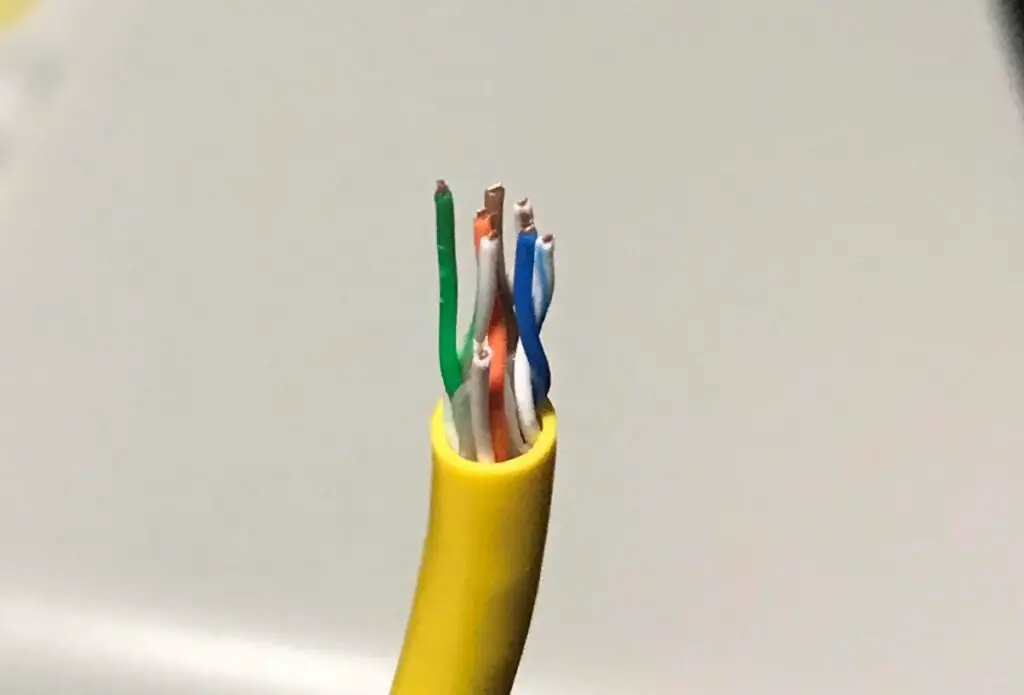
    Inside an ethernet cable, you’ll find 8 copper wires. This is what it looks like inside one of your ethernet cables:

    8 wires inside ethernet cable
    There are 4 pairs of twisted wires inside most ethernet cables

    These 8 wires are used to transfer information through the cable.

    How they do that isn’t super important for this discussion, so we’ll blast past that part.

    What’s important is that each of these 8 wires inside the ethernet cable has a job to do.

    Some wires are used to transfer data to the other side of the cable. Other wires are meant to receive incoming data from the other side.

    You might be shocked to find out that some of these wires inside an ethernet cable aren’t used at all.

    So now for the hard hitting question: how do you know which wires are meant to send data and which wires are meant to receive data?

    The answer to this question is similar to a sports team. Each position on the field has a certain job.

    The same goes for ethernet cables.

    The job of a particular wire is based upon the position of the wire inside the connector it’s attached to.

    So who says what wire is responsible for what?

    For this information, we have to go to another standard.

    Let’s meet the TIA/EIA-568 standard.

    The TIA/EIA-568 Standard

    The TIA/EIA-568 standard plays an important role in how ethernet cables are wired.

    In short, it provides a few different requirements that ensure ethernet cables are all made the same way. For this discussion, the area we’re focused on has to do with the wiring of cables.

    Going back to our sports analogy, if the wires inside the ethernet cable are the players on the field, the TIA/EIA-568 standard is the rulebook for the game.

    TIA/EIA-568 details what order the cables should be in inside the RJ45 connector to ensure all cables are made the same way.

    In other words, it defines the positions of the players (copper wires) and where they should stand on the field (RJ45 connector).

    So how does this apply to ethernet cables?

    To answer this, we need to refer back to the RJ45 connectors at the end of ethernet cables.

    Inside the connectors, there are 8 channels that the wires inside the ethernet cable fit in to.

    Ethernet cable wires inside RJ45 connector

    As you can see, the colored wires are laid out side-by-side in the channels of the RJ45 connector. What the TIA/EIA-568 standard does is it defines which wire should be in which channel.

    What’s interesting is that there are two different ways that these wires can be laid out inside the RJ45 connector. These are called ethernet cable pinout configurations.

    As long as the wires inside the RJ45 connector follow one of these standard pinout configurations, the ethernet cable will work properly. It doesn’t matter which one is chosen.

    Why are these standards important for backwards compatibility?

    Now that we’ve laid this all out, we can get to answering our question.

    How do the RJ45 and TIA/EIA standards allow these ethernet cables to be interchangeable?

    In order for ethernet cables to be interchangeable, two things need to be in place. The cables need to:

    • Be wired the same way
    • Have the same connector

    These two standards take care of both of those requirements. The RJ45 standard will make sure all the cables have the same connector and fit into the same devices. The TIA/EIA standard will ensure that wires inside the cables will be in the same order.

    To put it another way, if two different cables meet both of the above requirements, the only thing different about them will be the speeds they support. They’ll support different speeds because of the different wires that’re used inside the cable. It has nothing to do with the connector on them or the configuration of the wires inside the cable.

    This is why different categories of ethernet cables support different speeds. The wires inside the cables are made to different specifications. The different specifications determine the maximum speed the cable can support.

    The good news is, if you need to get an ethernet cable that supports a faster speed, it’ll be interchangeable as long as it’s a category 5e, 6, 6A, or 8 cable.

    Do yourself a favor and make sure you’re using one of these categories of cable in your network.

    Which ethernet cables are not backwards compatible?

    If category 5e, 6, 6A, and 8 cables are all interchangeable, which cables aren’t?

    There’s only one type of modern-day cable that isn’t. Category 7 cables.

    Some of the earlier versions of ethernet cables aren’t backwards compatible either, but you won’t see them in use today.

    To understand why cat 7 cables aren’t compatible with the other categories, let’s revisit the criteria we posed before. In order to be compatible with each other, cables need to:

    • Be wired the same way
    • Have the same connector

    Let’s address these criteria individually.

    Ethernet cable compatibility chart

    Are cat 7 cables wired the same way as category 5e, 6, 6A, and 8 cables?

    This is a definitive yes.

    Cat 7 cables are wired exactly the same way as the other common categories of cables. Cat 7 cables will be wired in one of the two approved configurations detailed by the TIA/EIA standard.

    Ok, so we can check the box of the first criteria that compatible cables need to meet.

    On to the next one.

    Do cat 7 cables have the same connectors as category 5e, 6, 6A, and 8 cables?

    This is where things fall apart.

    Category 7 cables don’t utilize the RJ45 standard for connectors. They use a different standard called GG45, which stands for GigaGate 45 or ARJ45, which stands for Augmented RJ45. They can also be outfitted with TERA connectors as well.

    Of course, the issue here with category 7 cable connectors is that they’re not interchangeable with the other commonly used categories of cables.

    On top of that, you won’t find any GG45/ARJ45 or TERA ports on any of your computers or internet devices.

    As a result, you won’t see these cables used very much.

    With that said, it’s possible to outfit a category 7 cable with an RJ45 connector, but there’s little benefit to this. If you outfit a category 7 cable with an RJ45 connector, it’ll have the same performance characteristics as a category 6 cable.

    In fact, if you try to buy a cat 7 cable online, you probably won’t find any with a GG45/ARJ45 or TERA connector. They’ll all have RJ45 connectors on them.

    Don’t fall for this. These cables are either fake, or they’ll perform just like a cat6 cable. You’re better off just buying cat6 cable instead.

    In conclusion, this is the reason why cat 7 cables are incompatible with cat 5e, cat 6, cat 6a, and cat 8 cables. They don’t utilize the same connector standard.

    Wrap up

    Well, there you have it.

    That’s a complete breakdown of which ethernet cable categories are compatible with each other.

    Chances are, the cables you have in your home all have RJ45 connectors, so you shouldn’t have any issues if you ever want to upgrade or replace them. You probably wouldn’t be able to get a cat 7 cable with a GG45/ARJ45 or TERA connector even if you tried.

    If you have any questions about this information, or you’d like to share you experiences with your ethernet cables, please drop a line below.

    If you’re interested in reading some more about similar topics, check out these posts that I’ve written:

    Do the Colors of Ethernet Cables Matter?

    How Long Do Ethernet Cables Last?

    Are Ethernet and Phone Cables the Same?

    How Do You Crimp Ethernet Cables?

    What Does Cat Mean for Ethernet Cables?

  • Are Ethernet and Phone Cables the Same?

    Are Ethernet and Phone Cables the Same?

    Ethernet and Phone Cables the Same title page

    Take a minute to stop and think about the different types of cables you have in your home. I’m sure you probably have:

    • Power cables
    • Phone chargers
    • Coaxial cables
    • Ethernet cables
    • Phone cables
    • Printer cables
    • Adapter cables

    The list goes on and on.

    What’s interesting about these cables is that many of them seem to accomplish the same thing. This often leads to questions about which cables can be used interchangeably.

    Two specific cables that generate the most questions are phone cables and ethernet cables.

    Are phone cables and ethernet cables the same thing? In other words, can they be used interchangeably?

    Unfortunately, ethernet and phone cables are not the same thing. There are multiple differences between these types of cables, and as a result, they’re used in different applications.

    Phone cables are designed to be used almost exclusively for connecting landline phones. Ethernet cables, on the other hand, are mostly used in computer applications.

    In this post, I’ll detail the differences between phone and ethernet cables. I’ll also answer some common questions about how phone and ethernet cables are used.

    What is the difference between ethernet cables and phone cables?

    Let me start by saying that phone and ethernet cables have the same purpose: they’re used to transfer data.

    They take data from one end of the cable and transfer it to the other end of the cable.

    That’s about where their similarities end.

    To start, let’s just compare what an ethernet and phone cable look like:

    Phone and ethernet cable comparison
    An ethernet cable on the left and a phone cable on the right

    They look pretty different, don’t they?

    Wait until you see them from a side angle:

    Phone and ethernet cable thickness comparison
    Phone cables are much thinner than ethernet cables

    Appearance isn’t the only way ethernet and phone cables are different.

    Despite achieving the same goal, phone and ethernet cables transfer data in different ways. This is why they can’t be used interchangeably.

    So how do these cables transfer data differently?

    There are 3 main differences between phone and ethernet cables that we’ll dive in to. These 3 differences are that phone and ethernet cables:

    • Have different numbers of wires inside them
    • Have different connectors attached to them
    • Support different data transfer rates

    Let’s take an in-depth look at each of these differences.

    Different number of wires

    One key difference between ethernet cables and phone cables has to do with what’s inside them.

    This all starts with the general construction of the cables. Essentially, phone and ethernet cables are just bundles of copper wires.

    The copper wires are what allows the transfer of data back and forth between the ends of the cables. Data is sent through these copper wires using a series of electronic signals.

    When a phone or ethernet cable is plugged into a device, the device is able to translate these electronic pulses into the message that was sent to them from the other end of the cable. Think of it almost like Morse code.

    Follow me so far?

    Ok, so if both ethernet and phone cables are made of copper wires, what makes them different?

    They’re different because they’re made up of a different number of wires.

    Phone cables consist of 4 copper wires, while ethernet cables have 8 copper wires inside them.

    For a visual, here’s what the inside of a phone cable looks like:

    Phone cable wires exposed

    There are 4 wires inside the cable.

    Compare that to what the inside of an ethernet cable looks like:

    Ethernet cable wires exposed

    As you can see, these two types of cables are more different than they first appear. There are twice as many wires inside an ethernet cable.

    As you’ll see later, this has an impact on how the two cables can be used.

    Connectors used on each cable

    Another major difference between phone and ethernet cables is the connector that’s attached to them.

    Both types of cables have plastic connectors attached to each end. These connectors serve a few purposes.

    For one, they make it easy to connect the cable to a device. That’s because the connectors for ethernet and phone cables have been developed to a standard.

    In other words, all ethernet cables will have the same connector at the end of them. All phone cables will have the same connector as well.

    Devices that are meant to be compatible with these cables will have specific ports that these standard connectors fit into.

    The other purpose of these connectors is to prevent the cables from falling out of the devices they’re connected to. This ensures that the device and cable maintain a reliable connection that doesn’t get interrupted while data is being transferred.

    How are phone and ethernet cable connectors different?

    Ok, now let’s get to how phone and ethernet cable connectors are different.

    The connectors on phone cables are called RJ11 connectors.

    The “RJ” in this naming convention stands for “Registered Jack”, and it refers to the standard that the connectors are made to.

    Conversely, connectors for ethernet cables are made to the RJ45 standard.

    Here’s a close look at an RJ11 and RJ45 connector next to each other:

    Phone and ethernet cable connector comparison
    The connector on the left is an RJ11 connector, and the connector on the right is an RJ45 connector

    When comparing these connectors, one thing to pay close attention to is the gold pins on the connectors.

    RJ11 and RJ45 connector pin comparison

    As you can see, there are 4 pins on the phone cable connector (RJ11) and 8 pins on the ethernet cable connector (RJ45).

    The reason for this is that there’ll be one gold pin on the connector for each wire in the cable. These pins allow the data traveling through the copper wires inside the cables to reach the devices that the cable is connected to.

    As we discussed previously, phone cables have 4 wires inside them, while ethernet cables have 8 wires inside them. That’s why phone and ethernet cables have quite different connector standards.

    Data transfer capacity

    The last major difference between phone and ethernet cables has to do with the data transfer rates they can support.

    This difference goes hand-in-hand with the number of wires inside each cable.

    To cut to the chase, ethernet cables can support much faster data transfer rates than phone cables can.

    Let’s get into the specifics.

    Speeds supported by phone and ethernet cables

    Phone cables support a maximum data transfer speed of 24 megabits per second (24 Mbps).

    Ethernet cables can support much faster data transfer speeds.

    There are multiple categories of ethernet cables, and each of these categories supports a different data transfer speed. With that said, the most commonly used ethernet cable categories (cat 5e and cat6) support maximum data transfer speeds of 1 gigabit per second (1 Gbps) and 10 gigabits per second (10 Gbps), respectively.

    In other words, ethernet cables can support data transfer speeds up to 40 times faster than phone cables.

    This all has to do with the applications that these cables are used in.

    Phone and ethernet cable applications

    Phone cables are most commonly used to provide a home or office with a landline phone connection. In these instances, the phone cables are used to transfer audio data from one phone to another. This telecommunication data doesn’t require a lot of bandwidth.

    On the other hand, the data transfer speed requirements for ethernet cables are much greater. This is because they’re used to support data moving between computers.

    The data moving between computers is much more variable than the data moving across phone cables. Telephone cables were originally designed to only transfer audio data, while ethernet cables were designed to transfer audio, video, and file data.

    This is why there are only 4 copper wires in a phone cable and 8 wires inside an ethernet cable. The more wires inside the cable, the faster the data transfer speeds they can support.

    A good analogy here is lanes on a highway. The more lanes there are, the more traffic that can be supported at a given time.

    Phone cables don’t need to support nearly as much data at a given time when compared to ethernet cables. That’s why they have less wires inside them.

    Can a phone line be used for internet?

    I previously mentioned that phone cables were originally designed to only transfer telecommunication data.

    This was long before the internet age and the widespread use of computers.

    As the internet age began and matured, the easiest way to connect computers to the internet was through the landline phone lines that were already running to everyone’s house.

    So at this time, everyone was using phone lines to connect to the internet. This was called dial-up internet. The maximum data transfer speed provided by dial-up internet was 56 kilobits per second (Kbps). Phone cables could more than support this requirement.

    As the internet matured, data transfer speed requirements increased. Eventually, dial-up internet using phone cables couldn’t support the data transfer speeds that were needed to keep up.

    This lead to the development of digital subscriber line internet, or DSL.

    Like dial-up internet, DSL provided internet over phone lines. However, instead of maximum speeds of 56 Kbps, most DSL providers could provide speeds up to 20 Mbps.

    In fact, many internet providers still offer DSL today.

    So if you have a DSL internet plan, you can still use phone cables to get an internet connection. With DSL, you’ll have a phone cable connecting your modem to a phone jack in the wall. This’ll provide your home with an internet connection.

    One thing to keep in mind here is that 20 Mbps is considered slow in today’s age of the internet. With DSL you can probably support 1 person using the internet and streaming videos. If you have multiple people in your home who all use the internet at the same time, you may want to upgrade your service to a faster internet plan (which won’t use phone cables).

    Can phone lines be used as ethernet cables?

    If you can still use phone cables to connect to the internet (i.e. if you have a DSL plan), can you also use phone cables to connect your devices together?

    Unfortunately, the answer here is no.

    To answer this question, I’ll refer you back to the differences between ethernet and phone cables.

    They don’t fit into ethernet ports

    For starters, today’s internet devices don’t come with fittings for RJ11 devices.

    If you look at any of your internet-connected devices, the vast majority will have ports that are made for an RJ45 connector. This is because they’re designed to be used with ethernet cables.

    So even if you wanted to, you couldn’t use a phone cable as an ethernet cable because it wouldn’t fit into the devices you were trying to connect to.

    Check this out for a visual example:

    Phone cable plugged into laptop ethernet cable jack

    In the photo above, I’m attempting to plug a phone cable into the ethernet port on my laptop.

    It might be a little difficult to see, but the phone cable doesn’t securely fit into the ethernet port. If you look closely, you might be able to see the gap on the right-hand side of the ethernet port.

    Hopefully that’s enough evidence that phone cables can’t be used as ethernet cables.

    If not, let’s refer back to the data transfer rates of phone cables and ethernet cables.

    Data transfer limitations

    Ethernet cables support much faster speeds (up to 1 Gbps or greater) than phone cables (up to 24 Mbps). So even if you could use a phone cable to connect your devices like an ethernet cable, it’d greatly slow down you network. The phone cable wouldn’t be able to support the data transfer speeds that your devices require.

    If you don’t have any on hand, the best thing to do here is pick up a few cat5e or cat6 cables.

    While you’re at it, you can probably get rid of any extra phone cables you have. Unless you still use a landline telephone or DSL internet, they won’t be of much use.

    Wrap up

    At this point, it should be clear that phone and ethernet cables have different purposes, and you can’t use them interchangeably. In fact, most home networks don’t have a use for phone cables anymore.

    The only reasons why you’d still be using phone cables in your home network would be if you still have a landline phone, or you have a DSL internet plan.

    If you have any questions about the information in this post, please drop me a comment below.

    If this was useful information for you, check out some other posts I’ve written on similar topics:

    What Does Cat Mean for Ethernet Cables?

    The Difference Between Cat5e and Cat6 Cables

    How to Tell What Type of Ethernet Cable You Have

    Do the Colors of Ethernet Cables Matter?

    Is an Ethernet Cable Faster Than WiFi?

  • Do the Colors of Ethernet Cables Matter?

    Do the Colors of Ethernet Cables Matter?

    Colors of ethernet cables matter title page

    Ethernet colors come in a variety of colors.

    If you’ve ever bought ethernet cables online (like these for example), I’m sure you’ve seen the options that’re available to you. To name a few choices, you can find ethernet cables in the following colors:

    • Gray
    • Black
    • Blue
    • Red
    • Green
    • White
    • Yellow

    Depending upon where you look, you can find many other colors in addition to the ones listed above.

    A lot of questions come from these different color choices.

    What is the difference between cables that are different colors?

    Do I need to buy cables that are a specific color?

    Do all my ethernet cables have to be the same color?

    All of these questions boil down to one basic question: does the color of my ethernet cables matter?

    Thankfully, the answer is pretty straightforward.

    The color of an ethernet cable doesn’t matter. A cable’s color has no impact on the performance or configuration of the cable.

    Cables are made in different colors to make things easier on the end user. If a certain color is used for certain types of devices, a user can quickly identify what a cable in their network is used for.

    In this post, I’ll discuss all you need to know about the colors of your ethernet cables. I’ll also answer a few of the most commonly asked questions when it comes to selecting what color of ethernet cable to buy.

    What do the different colors of ethernet cables indicate?

    Let’s compare two ethernet cables that are different colors.

    Here are two ethernet cables that I use in my home network:

    Two Cat5e ethernet cables of different colors

    They’re both the same category of cable (cat5e), and the only difference between them is their color.

    So the question is, will these two cables perform differently?

    The answer is no.

    The reason for this is because the color of the cable has no impact on its performance. The two cables above will perform exactly the same.

    Think of it like two cars that are the same year, make, and model. One is painted red and the other is painted black.

    Even though the cars are different colors, everything about the performance of the cars is the same.

    Both cars will accelerate at the same rate, get the same gas mileage, and have the same top speed.

    The same principle applies with ethernet cables.

    In this case, as long as the design and technical configuration of the cable is the same (i.e. the category of the cable is the same), it doesn’t matter what color it is.

    The category of the cable will tell you about it’s design, so that’s much more important to pay attention to if you want to know how a cable will perform.

    To say it differently, you can’t tell anything about an ethernet cable by looking at what color it is.

    For example, here are two other cables in my network:

    Two different category ethernet cables of the same color

    The cable on the left is a cat5e cable and the one on the right is a cat6 cable.

    Even though they’re both yellow, they have totally different performance specifications. The cat6 cable will support faster speeds than the cat5e cable because it’s built to higher specifications.

    The same would be true regardless of the colors of the two cables.

    What color ethernet cable should I use?

    If the color of an ethernet cable doesn’t affect its performance, does that mean you can use any color cables you want in your home network?

    Yes it does.

    You can choose any color of ethernet cable that you like. With that said, there are a few considerations you might want to keep in mind when choosing your cable color.

    Where will the cable be located?

    Perhaps the most important question to ask yourself is where your ethernet cables will be located. Answering this question can go a long way towards helping you figure out what color of ethernet cable to get.

    For example, will you be wiring ethernet cable jacks in different rooms of your home?

    If that’s the case, the ethernet cables will be located in the walls and ceilings of your home. You won’t be able to physically see the cables, so it doesn’t matter what color you choose.

    You’re free to choose any color of the rainbow.

    What if your ethernet cables will be out in the open in your home? Does that change the color selection of your cables?

    Honestly, that boils down to how much you care about how your house looks.

    If you don’t want your ethernet cables standing out, you might want to pick a color that matches the walls of the room the cable will be in. This might be especially important if you have long ethernet cables.

    Here’s an example of what I’m referring to:

    Gray cable against gray wall

    As you can see, with the gray walls in my home, a gray ethernet cable is a good choice. It blends in with the background and you don’t really notice it.

    What would this look like if I used yellow ethernet cables?

    It wouldn’t look very pretty:

    Yellow cable against gray wall

    The yellow ethernet cable is much more noticeable than the gray ethernet cable.

    Again, for some people it isn’t a big deal if their ethernet cables don’t match their environment. It’s just something to consider when deciding what color to get.

    How complex is your network?

    The other variable to consider when selecting an ethernet cable color is how complex your network will be.

    If you’re like me and your home network isn’t very complicated, the color of your ethernet cables won’t matter as much.

    To give you some perspective, I currently have yellow, black, and gray ethernet cables in my home network. With that said, my home network isn’t very complex so I can get away with it.

    Here’s what my home network looks like:

    Router with ethernet cables

    At the end of the day, I don’t have too many wired devices in my home. As a result, I’m not too worried about grouping my wired devices by color.

    If I wired my entire house with ethernet cables, and had multiple ethernet switches with different cables plugged into them, that would be a different story.

    If you’ve seen pictures of datacenters or other complex environments, you may have noticed that the ethernet cables are all the same color.

    I’ll refer you to example A:

    Datacenter ethernet cables

    The cable colors are coordinated because it makes it easier for IT administrators to identify what each cable is used for. If the network wasn’t organized like this, it would be much harder to find out what each ethernet cable is used for.

    I’m sure you’ve experienced a similar situation in your home when a bunch of wires are tangled together. It can make it extremely difficult to figure out what wire goes to what device. This is what complex environments are avoiding by coordinating the colors of their cables.

    I would imagine for most home networks this color coordination of ethernet cables may not be necessary, but it’s something to consider if you have a lot of security cameras or other wired devices in your home.

    Do all my ethernet cables have to be the same color?

    Ok, so we’ve established that we have freedom when picking what color of ethernet cable we want to use. We can choose any color of cable we want.

    A common follow-up question to this is: once you pick a color, do all your ethernet cables have to be the same color?

    The answer is no. You have freedom here as well.

    Take my home network for example.

    As I mentioned, I have 3 differently colored cables in my network. It might not be the prettiest, but it gets the job done.

    Every single cable in your network can be a different color if you so desire.

    This supports the key point that the color of the cable has no impact on its performance. So long as the cable is a category that supports the speed of your network, the color doesn’t matter. This is true for every ethernet cable in your network.

    Wrap up

    The color of an ethernet cable doesn’t have an impact on its performance, but that doesn’t mean it can’t be useful.

    You can use ethernet cable colors to organize your network, or make them blend into the background of the room they’re in.

    For many people, the color of an ethernet cable isn’t even a consideration. As long as the cable works, it doesn’t matter what color it is.

    The bottom line is, the choice is yours. You can put as much or as little thought into it as you want.

    If you have any questions about any of the information in this post, or you’d like to share your experiences with ethernet cable colors, please drop a comment below.

    If you found this post helpful, be sure to check out some of the other posts I’ve written on similar topics:

    What Does Cat Mean for Ethernet Cables?

    How Long Do Ethernet Cables Last?

    How to Extend an Ethernet Cable

    Does Ethernet Cable Length Affect Network Speed?

    Can an Ethernet Cable Slow Your Internet Speed?
  • Can You Reuse an RJ45 Connector?

    Can You Reuse an RJ45 Connector?

    Reuse RJ45 Connector title page

    In order to make your own ethernet cables (or modify ones you have), you need quite a few tools to get the job done correctly.

    If you’re crimping your own cables, you may have:

    • A crimping tool
    • An ethernet cable stripping tool
    • RJ45 connector boots
    • An ethernet cable testing device

    In addition to the items above, you’ll also need RJ45 connectors (also called ethernet cable connectors) for any crimping job you do.

    Of all the tools needed to crimp an ethernet cable, RJ45 connectors cause the most questions.

    The most common question surrounding these connectors is if they can be reused or not.

    In other words, if you remove a connector from one cable, can you attach it to another cable? Or if you remove a connector to shorten one of your ethernet cables, can you reattach the same connector to the end of it?

    There’s good and bad news here.

    RJ45 connectors cannot be reused once they’ve previously been attached to another cable. With that said, RJ45 connectors are very inexpensive, and you can buy them online or your local electronics store for an affordable price.

    In this post, I’ll break down everything you need to know about why you can’t reuse RJ45 connectors, as well as your alternatives if you need to replace one.

    How is an RJ45 connector attached to an ethernet cable?

    In order to understand why RJ45 connectors can’t be reused, you first need to understand how they’re attached to cables in the first place.

    RJ45 connectors are attached to cables through a process called crimping.

    When you crimp an connector onto an ethernet cable, a few different things are happening at the same time.

    The copper wires are joined to the RJ45 connector pins

    The first (and most important) thing that happens during crimping is the copper wires inside the ethernet cable are joined with the metallic pins on the RJ45 connector.

    Let’s slow things down here a bit.

    Inside an ethernet cable, there are 8 copper wires.

    Wires inside ethernet cable

    These 8 wires make the ethernet cable work as intended. Data is sent through these wires from one end of the cable to the other in the form of electric signals.

    The next piece of this is the RJ45 connector.

    The RJ45 connector needs to take the electric signals from the 8 copper wires and transfer them to the device its plugged in to.

    In order to accomplish this, you might notice that RJ45 connectors have metallic pins on them.

    Metallic pins on RJ45 connector

    These pins transfer the electric signals from the wires in the cable to your devices.

    For your information, if you look closely at the ethernet ports on your devices, you’ll also see metallic pins.

    Ethernet port pins

    When these pins are in contact with the pins of the RJ45 connector, the electric pulses from the connector are able to travel to the ethernet port of the device.

    The pins on the RJ45 connector and ethernet port basically serve as extensions to the copper wires in the ethernet cable.

    So yeah, the pins are a pretty big deal. Without them, your ethernet cables wouldn’t be able to transfer their information to your devices.

    The reason crimping is so important here is because the crimping process is what connects the wires in an ethernet cable to the pins of the RJ45 connector.

    How ethernet cable wires and RJ45 connector pins are joined

    As I mentioned, the crimping process connects the 8 wires inside the ethernet cable with the pins on the RJ45 connector.

    It’s important to understand how that happens, because it gives us good background when answering the question if RJ45 connectors can be reused or not.

    Let’s start with a connector that’s never been connected to an ethernet cable.

    Here’s what it’ll look like:

    Unused RJ45 connector

    Everything looks normal there, right?

    As you can see, there are 8 pins. There’s one pin for each wire in the ethernet cable. Below each pin is a channel that each of the copper wires in the cable fits in.

    When you look at the RJ45 connector from the side, you’ll notice that the gold pins on the connector are a little raised.

    RJ45 connector pins up

    If you look a little closer, you’ll see that on the bottom of each of these pins is 3 prongs.

    Prongs on RJ45 connector pin

    These prongs are used to pierce into the copper wires of the ethernet cable during the crimping process.

    During crimping, a crimping tool is used to push the pins down into the wires beneath them.

    After the crimping process, the pins won’t be raised like they were before.

    On top of that, you’ll see that the prongs from the pin are now going into the wires beneath them.

    RJ45 connector prongs in wire

    This is what ensures a good connection between the wires and the pins on the RJ45 connector.

    Ok, that covers the first part of the crimping process.

    Now let’s talk about the other action that happens during crimping.

    The RJ45 connector is clamped onto the sheath of the cable

    The other action that happens during the crimping process has to do with the protective sheath of the cable.

    When a connector is crimped onto a cable, it’s clamped onto the cable’s sheath. This action prevents the RJ45 connector from separating from the cable.

    Here’s what it looks like after the crimping process:

    RJ45-connector-crimped-on-ethernet-cable-sheath

    As you can see, the pointed plastic piece has been pressed onto the cable. This makes it much harder for the connector to get ripped off.

    If the connector and cable were only attached to each other by the connector’s pins and the wires of the cable, the connector could get ripped off the cable. This would cause the wires inside the connector would break.

    Clamping the connector onto the outer sheath of the cable helps prevent this from happening.

    Can an RJ45 connector be reused?
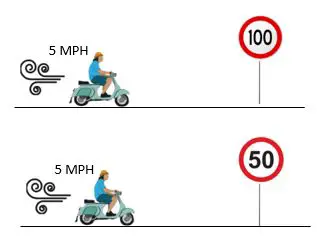
    Now we have a good understanding of how RJ45 connectors are connected to ethernet cables through crimping.

    With this information, we can clearly answer whether RJ45 connectors can be reused or not.

    To put it simply, the answer is no.

    Once they’ve been crimped, RJ45 connectors can’t be reused.

    The main reason for this has to do with the pins on the RJ45 connector.

    As I mentioned above, the pins on an RJ45 connector are raised before they’re crimped. These pins are pushed down and clamped onto the wires beneath them during crimping.

    Once these pins are pushed down, there’s no way to clamp them on a new set of wires. In other words, the crimping process is irreversible when it comes to RJ45 connectors.

    I actually learned this the hard way when I first got my crimping kit.

    I wanted to see how my crimping tool worked, so I put an RJ45 connector into the tool and pressed down.

    Crimping RJ45 connector with crimping tool

    Upon removing the RJ45 connector from the crimping tool, I realized my mistake.

    The pins on the connector were pushed down.

    As a result, I couldn’t insert the copper wires from the ethernet cable as far into the RJ45 connector as I needed to. The pins that were pushed down were blocking the wires.

    If you’d like, you can even test this for yourself. Use your crimping tool on an RJ45 connector that isn’t attached to a cable. You can actually see the pins of the connector being pushed down by the crimping tool.

    If you look closely, you can see the 8 pins pushed down at the end of the connector.

    RJ45 connector pins being pushed down

    The bottom line here is: once you’ve used a crimping tool on an RJ45 connector, it can’t be reused.

    What should you do if you need an RJ45 connector?
    Finding out that RJ45 connectors can’t be reused probably isn’t the best news.

    It’s not all bad news, however.

    If you need an RJ45 connector for an ethernet cable, you have a few good options.

    Buy spare RJ45 connectors

    If you’re going to be crimping your own ethernet cables, you’re going to need RJ45 connectors.

    If you can’t reuse the connectors you have, what are you supposed to do?

    Buy some!

    You can find RJ45 connectors online or at your local electronics store. They’re inexpensive, and they usually come in packages with multiple connectors.

    The best thing to do is buy a bunch of connectors so you always have some fresh ones on hand when you need them.

    It might not be as easy as reusing the connectors you have, but it’s still pretty easy.

    Buy new ethernet cables

    If you don’t envision yourself crimping a lot of cables in the future, or you don’t want to keep an inventory of RJ45 connectors, you have another option.

    You can just buy new ethernet cables when you need them.

    This might be a good approach if you have a connector break and you just want to replace it, but it won’t solve your problems if you want to build your own custom ethernet cables.

    On top of that, if you replace multiple ethernet cables just because they have a broken RJ45 connector tab, it’ll cost you more to buy replacement cables instead of buying a crimping kit and fixing them on your own.

    If you need connectors, I recommend you just buy some spare connectors instead of buying brand new cables. It can save you money in the long run.

    With that said, if you take good care of your cables and you don’t need any that are custom lengths, you can probably get away with just buying new cables when needed.

    It all depends upon your unique situation and what’s best for your home network.

    Wrap up

    Let’s go over what we’ve learned today.

    You can’t reuse RJ45 connectors after they’ve been crimped.

    You can, however, buy replacement RJ45 connectors that you can use any time you need one.

    If you have any questions about the information in this post, or you’d like to share your experiences with replacing ethernet cable connectors, please feel free to drop a comment below.

    If this information was helpful to you, check out some of these other posts on similar topics:

    How Do You Crimp Ethernet Cables?

    How Long Do Ethernet Cables Last?

    The Difference Between Cat5e and Cat6 Cables

    How to Extend an Ethernet Cable

    What Does Cat Mean for Ethernet Cables?